A trading platform should make it easier to research a market, place the intended order and track what happens next. A polished chart is useful, but it cannot compensate for missing instruments, confusing order controls or costs that only become clear after opening an account.
The right comparison starts with your trading requirements, not a feature count. TradingView, MetaTrader 5 and cTrader deserve consideration for different reasons, while a broker’s own platform may offer the most direct route to the account features you need. Compare the complete setup: software, brokerage account, market data, execution access and ongoing charges.
Trading Platform vs Broker: What Are You Choosing?
For a brokerage account, distinguish the interface from the firm providing the account. The platform is the software used to view information and submit instructions. The broker provides the account and determines which products and services that account can access. One company may provide both, but they remain separate parts of the decision.
Start with three questions: Can you open the required account where you live? Can that account trade the instrument you want? Does the chosen platform connection support the functions your strategy needs? Get written confirmation rather than assuming a familiar platform name answers all three.
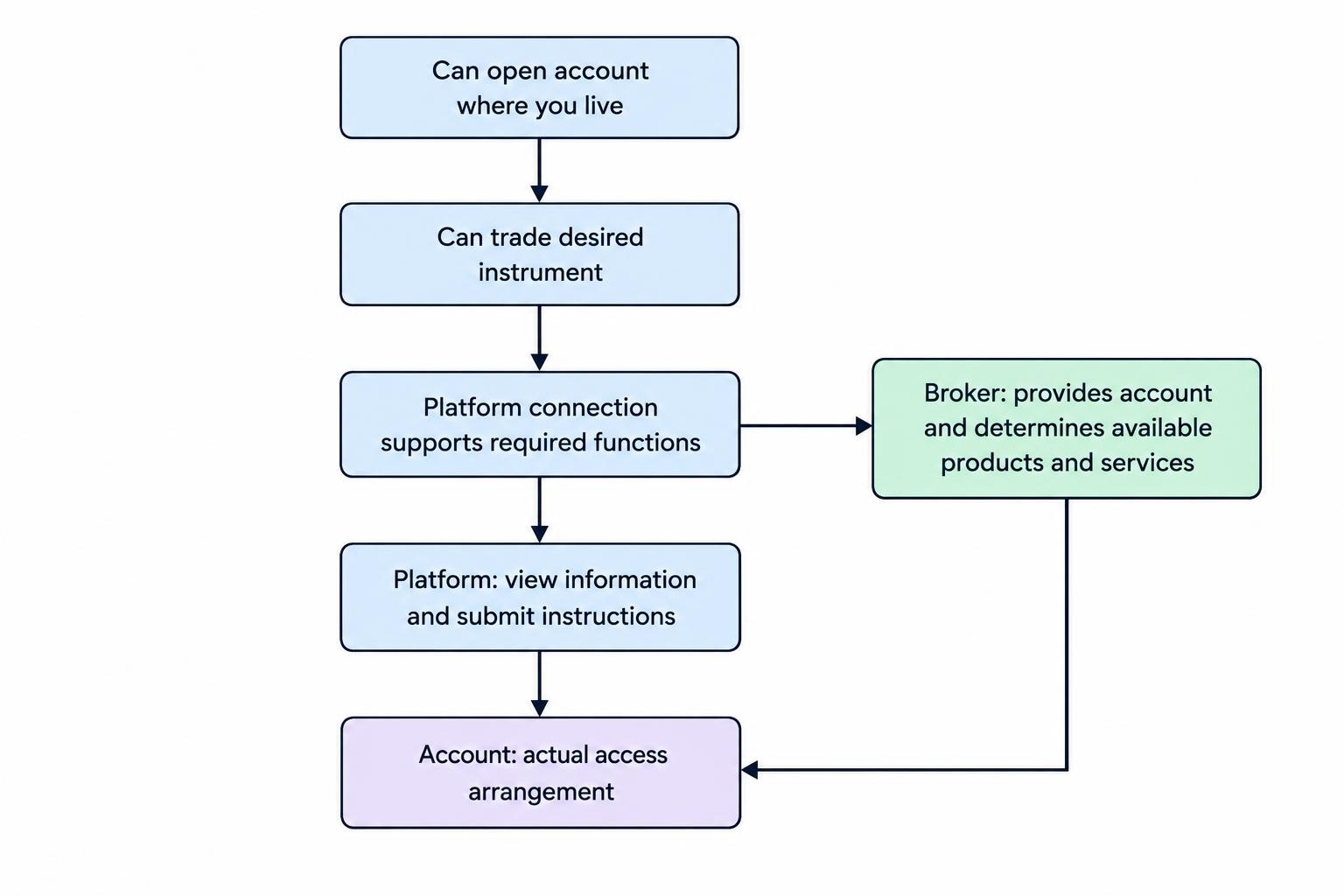
Also identify the product behind each symbol. Exposure to a stock through a derivative is not the same arrangement as owning the stock. A chart showing an index does not establish that you can buy the index itself, or that every product tracking it has the same contract terms.
For US residents, account eligibility and product availability should be early filters. Do not pay for software, indicators or hosting until you have confirmed that the intended account and connection are available to you.
Which Trading Platform Features Matter Most?
Order Entry and Position Management
Evaluate the complete order process, not just the buy and sell buttons. Can you review quantity, estimated exposure, order duration and attached exits before submitting? Can you distinguish a pending order from an open position without hunting through several windows?
Test modification and cancellation too. A platform should make the status of your instruction clear: submitted, acknowledged, partially filled, filled, rejected or canceled. An action appearing on screen is not enough; look for confirmation of the resulting order state.
Order controls do not remove market risk. A stock market order does not guarantee an execution price, and a conventional stock stop order becomes a market order after its trigger is reached. The SEC’s explanation of stock order types sets out these distinctions. A button labeled “stop loss” is not a promise that a loss cannot exceed the amount displayed.
Charts, Alerts and Data
Choose charting tools around decisions you actually make. A trader comparing several timeframes may need synchronized charts. Someone reviewing positions once a day may gain more from clean watchlists, reliable alerts and readable account reports.
Check the exact instrument, venue, session and data status behind a chart. Ask whether prices are live or delayed, whether the feed covers the venue you trade, and whether extended trading hours are included. Do not assume two matching ticker labels represent identical data.
Alerts also need a practical test. Confirm how they trigger, when they expire and where notifications arrive. An alert that reaches an unattended email account may be technically successful and operationally useless.
Reporting, Device Access and Recovery
Request a sample account export before committing. Check whether it contains timestamps, quantities, prices, commissions, financing charges and transaction identifiers in a usable format. Screenshots are poor substitutes for records you can reconcile.
Repeat important tasks on every device you intend to use. Prioritize finding open positions, checking working orders and contacting support. Mobile access is most valuable when it lets you manage an existing situation clearly, rather than reproduce every desktop chart.
Ask what happens if the application closes or the connection fails. Confirm where protective orders and automated processes run, and identify an alternative method of reaching the account.
TradingView, MetaTrader 5 and cTrader Compared
These platforms should not be ranked on appearance alone. The following comparison is a starting point for a shortlist, not a claim that any one platform produces better trading results.
| Platform | Reason to Consider It | Main Question to Resolve |
|---|---|---|
| TradingView | Charting, watchlists, alerts and Pine Script analysis | Does the subscription and selected broker connection cover your intended workflow? |
| MetaTrader 5 | Account trading combined with MQL5 Expert Advisors and strategy testing | Does the broker’s account configuration support your instruments and trading requirements? |
| cTrader | Trading tools combined with cBots and custom indicators | Does the account offering and automation setup meet your requirements? |
| Broker’s Own Platform | An account interface worth evaluating alongside third party software | Can it handle your research, orders and reporting without another paid application? |
TradingView: Assess the Research Workflow and Connection Separately
TradingView is a candidate for traders who want charts, watchlists, alerts and script based analysis in one workspace. Its subscription tiers have different allowances for charts, indicators, alerts and historical data, so compare the functions you need rather than buying the largest plan automatically.
Treat research access and order execution as separate checks. Seeing a market on a chart does not establish that your connected account can trade it. Before subscribing, list the instruments and order instructions you intend to use, then verify them through the intended connection.
The dedicated TradingView charting, alerts and trading tools guide covers that platform in greater detail. At the comparison stage, the decision is whether its research tools justify any extra subscription and connection work.
MetaTrader 5: Check the Account and Automation Requirements
MetaTrader 5 deserves consideration when your workflow includes account trading and automated strategies. Its automation framework uses MQL5 programs, including Expert Advisors, with development and strategy testing tools described in the official MetaTrader 5 algorithmic trading documentation.
The account offering still needs its own assessment. Ask the broker to confirm instrument availability, contract sizes, trading sessions, execution settings and charges. Do not treat a platform download as evidence that a particular account offers everything shown in a product demonstration.
For an existing automated strategy, check dependencies before moving. Record the required indicators, external connections, files and hosting arrangements. A successful installation is only the start; the program must also behave correctly with the intended account and market data.
cTrader: Evaluate Manual Trading and Automation Together
cTrader is another candidate where traders want account trading and programmable tools in the same platform family. Its current automation framework supports cBots and custom indicators developed in C# or Python, as set out in the official cTrader Algo documentation.
Language support is a useful filter, not a complete purchasing decision. Check whether the development environment, runtime, required packages and hosting arrangements fit the strategy you intend to run. Then test order handling and reporting through the actual account connection.
For manual trading, rehearse ordinary tasks before evaluating extras: entering an order, attaching protection, changing quantity and closing part of a position. A platform that makes those actions clear may be more useful than one with another screen of indicators.
How to Compare Trading Platform Costs
Separate fixed charges from costs that change with activity. A useful monthly estimate is:
Software subscription + market data + hosting and add-ons + trading charges + financing and other account charges.
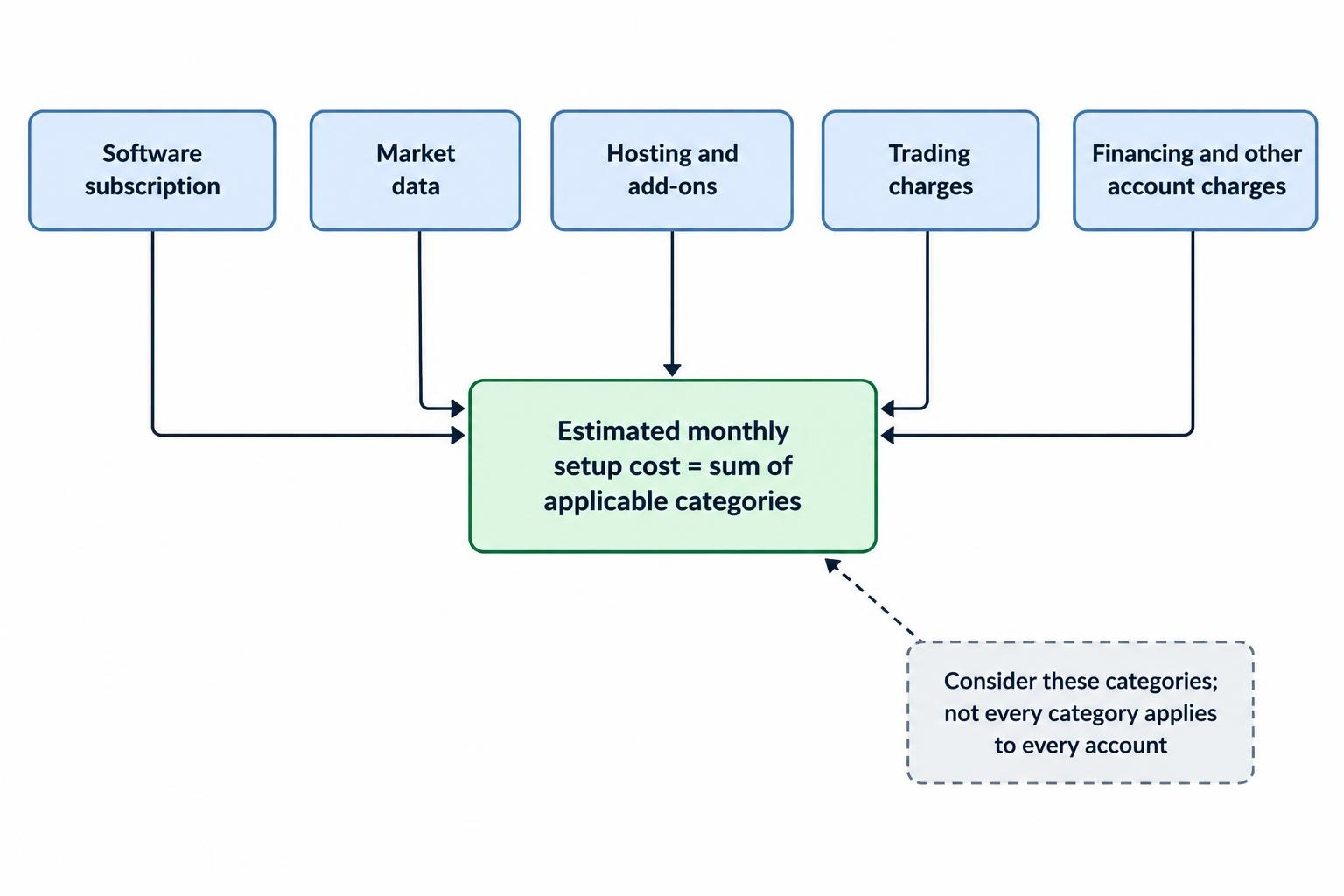
Not every category applies to every account. The point is to identify the full bill rather than compare one advertised number.
Software Subscriptions and Billing Terms
Compare the actual payment, renewal price, cancellation terms and required subscription tier. An annual plan advertised at a monthly equivalent still commits you to an annual purchase. A discount offers little value if the platform fails your workflow test.
TradingView’s subscription pricing and feature comparison distinguishes plan allowances and states that additional exchange data can be purchased separately. Use the checkout applicable to your location and billing cycle rather than relying on an old price quoted elsewhere.
For software supplied through an account provider, request the full charge schedule. Ask whether access depends on account activity, balance or another condition. “Included” should begin a conversation about total cost, not end it.
Market Data and Additional Tools
Budget for the data your process needs, not every available feed. Ask about the exchange, depth of data, subscriber classification and permitted use. CME Group’s market data policies and fee schedules separate licensing policies, display arrangements and other uses; check the applicable terms through your provider.
Keep purchased indicators, strategy subscriptions, hosting and connectors on separate lines in your comparison. That makes it easier to see whether an inexpensive platform becomes costly once the required extras are added.
Trading charges also matter. Include commissions, spreads, relevant financing costs and currency conversion charges where applicable. A low software bill does not establish a low cost trading setup.
A Hypothetical Monthly Comparison
Suppose Setup A costs $35 for software and $15 for data, while Setup B has no separate software charge but costs $25 for data. Assume A charges $4 per completed round trip and B charges $5.
At 20 round trips, A costs $130 and B costs $125. At 100 round trips, A costs $450 and B costs $525. These are invented comparison inputs, not provider quotes, and exclude spreads, financing and execution differences.
The exercise shows why activity assumptions matter. Repeat it using your expected trade size, frequency and holding period. Do not increase trading activity to make a subscription appear economical; the invoice is not your strategy.
Test the Platform Before Committing
Use the same tasks across every candidate. A consistent test reveals more than unrelated product demonstrations.
- Rebuild a normal workspace. Add your instruments, charts, alerts and account views.
- Rehearse order handling in simulation. Submit, modify and cancel orders, then inspect the recorded results.
- Check an interruption. Reconnect and reconcile working orders and positions before sending another instruction.
- Export the records. Confirm that transactions and charges can be reviewed outside the platform.
- Verify support access. Find the route for account problems and urgent order questions.
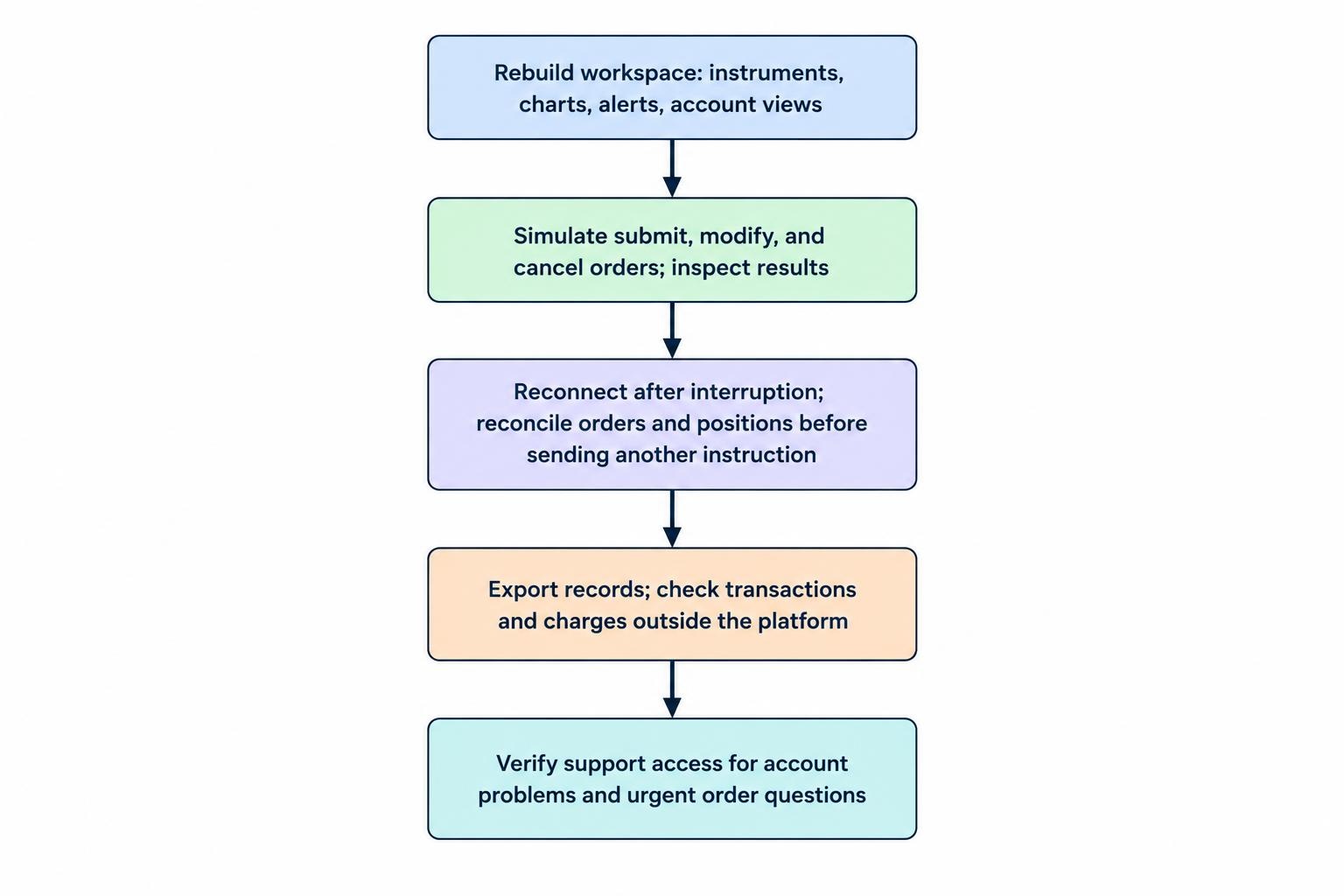
Simulation is useful for learning controls and testing procedures. It does not establish what live fills, liquidity or trading costs will be. Keep that distinction explicit when comparing paper trading with live trading for automated systems.
Write down failures as well as conveniences. A confusing quantity field or an unclear rejection message deserves more weight than an attractive chart template. Some faults can be worked around; others conflict directly with the way you trade.
Choose the Platform That Fits the Account and Task
Make account eligibility, instrument access and required order functionality pass or fail conditions. Only compare convenience and price after those conditions are satisfied.
For a chart focused workflow, assess TradingView’s research tools against its subscription and connection requirements. For automation centered on Expert Advisors, examine MetaTrader 5’s trading tools and Expert Advisors alongside the account configuration and hosting needs.
If C# or Python automation is part of the requirement, assess cTrader’s trading, charting and automation tools against the same practical tests. Include the broker’s own platform in the comparison rather than assuming a separate application is necessary.
The best fit is the setup that supports your required markets, makes order status clear, produces usable records and has a cost you can justify. More features are worth paying for only when they solve a problem you actually have.