Trading alerts connect a market event or account condition to the person or system expected to respond. Email provides room for context, SMS offers a separate mobile contact route, push notifications connect an alert to an app, and webhooks send events to another application. The right choice depends on what must happen next, not which channel makes the loudest noise.
A watchlist update and a rejected order should not share the same delivery rules. One can wait for a review; the other may need immediate investigation. Within a broader trading communication process, each alert should have a clear trigger, recipient, expiry time and response procedure.
The distinction that matters most is simple: an alert reports a condition. It does not prove that someone saw it, that an order reached a broker, or that a trade executed.
How Trading Alerts Work
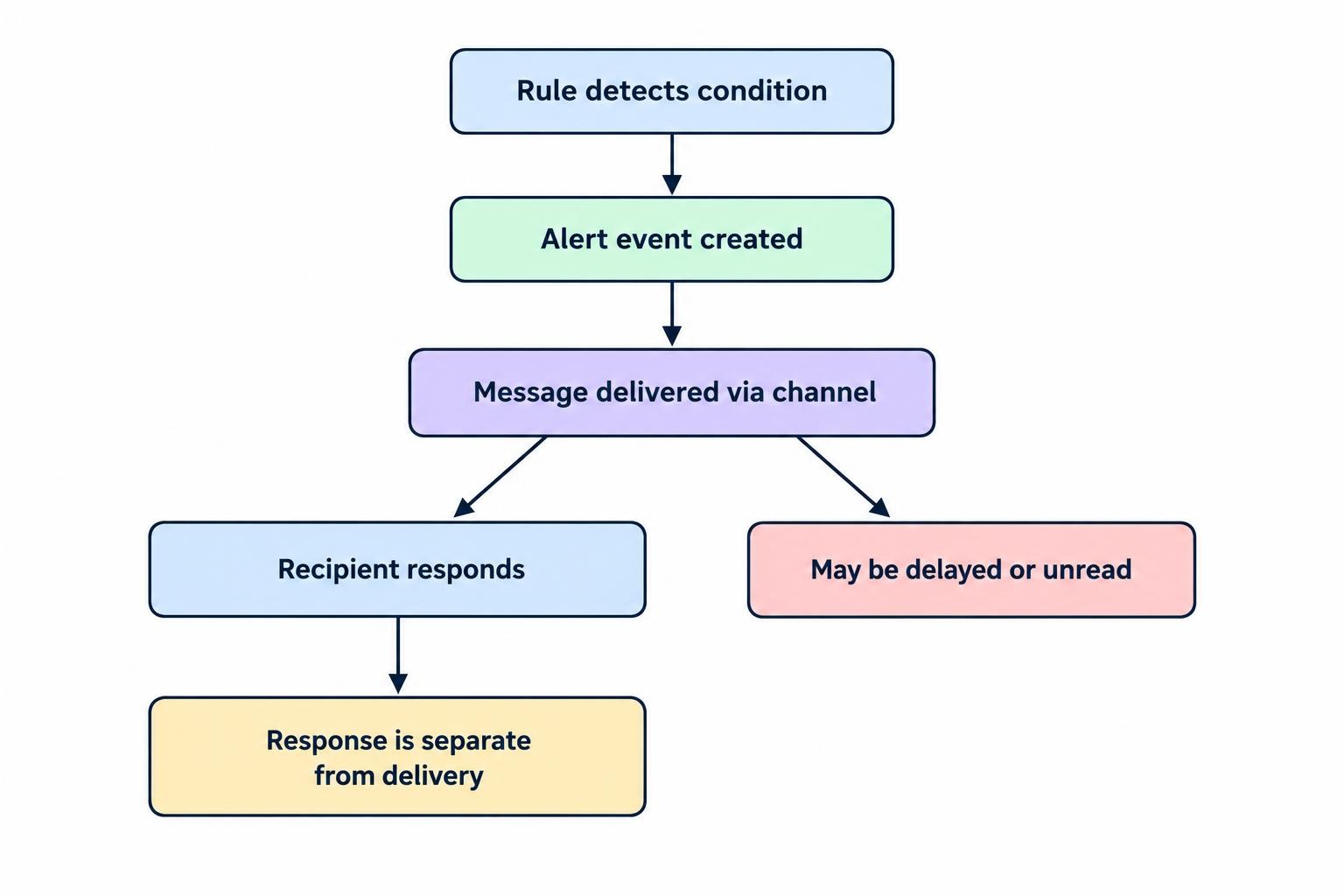
An alert starts with a rule. That rule might monitor a price crossing a level, an indicator changing state, an approaching economic release, a position exceeding an exposure threshold, or a connection failing. When the condition matches, the alert engine creates an event and passes it to a delivery channel.
Keep three stages separate: detecting the event, delivering the message and responding to it. A correctly detected price move can still produce a delayed notification. A delivered notification can remain unread. A webhook accepted by a server can still fail during later processing.
Before choosing delivery methods, define whether the rule reacts during a price bar or only after that bar closes. Also specify whether it fires once, every time the condition becomes true, or repeatedly while the condition remains true. These choices change the alert’s meaning, not just its frequency.
Check the underlying feed too. A notification cannot recover time already lost through delayed market data. Record both the market event time and the alert creation time so recipients can judge its age.
Email, SMS, Push Notifications and Webhooks Compared
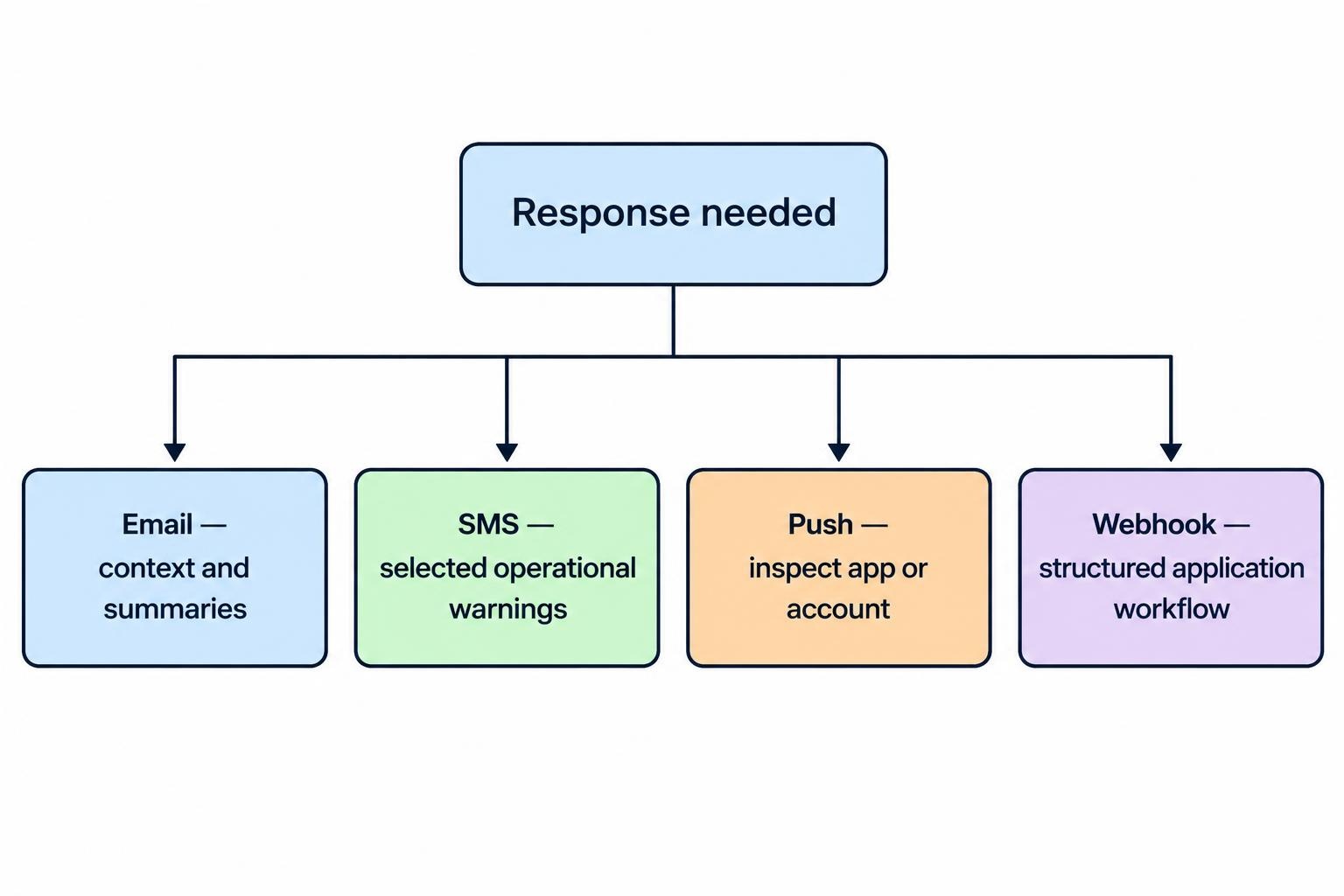
Choose a channel around the response you expect. The following table is a starting point for designing delivery rules, not a ranking of guaranteed speed or reliability.
| Channel | Recommended role | Design consideration | Suggested response |
|---|---|---|---|
| Research updates, summaries and detailed explanations | Allow for delivery delays and later review | Read the context and investigate when appropriate | |
| SMS | Brief operational warnings and escalation | Track delivery status separately from acknowledgment | Open the trusted platform and assess the issue |
| Push notification | Price alerts and app-based monitoring | Set an expiry time and test device settings | Open the relevant instrument or account screen |
| Webhook | Structured events sent between applications | Validate, store and process each event safely | Run an approved workflow with separate controls |
Email: Use It for Context, Not a Countdown
Email suits alerts that need an explanation: which condition triggered, what changed, which instruments are affected and what deserves review. A daily watchlist summary can carry much more useful context than a series of short interruptions.
Do not build a deadline-sensitive response around immediate email arrival. SMTP includes queuing and retry behavior when messages cannot be transmitted immediately, documented in the RFC 5321 email transport specification. Successful submission is not a promise of immediate inbox delivery.
Use subject lines that identify the event and its age. “Watchlist review: three thresholds crossed at 14:05 UTC” is more useful than “Important trading alert.” Put the trigger, timestamp and expected response near the top. Keep supporting commentary below them, rather than making readers hunt through a miniature research report.
SMS: Reserve It for Messages Worth Interrupting Someone
Consider SMS for a short list of operational events, such as repeated order rejections or an unresolved account warning. Give the recipient enough information to identify the problem without putting balances, credentials or sensitive position details into the message.
Distinguish provider acceptance from delivery. In Twilio’s message status definitions, “sent” means the upstream carrier accepted the message; “delivered” reflects delivery confirmation from the carrier and, where available, the handset. Neither should be treated as a trader’s acknowledgment.
Keep the wording direct: “Order rejection detected at 14:05 UTC. Review pending orders in your trading platform.” Avoid turning an operational warning into a buy or sell instruction. Budget for normal traffic and a burst of repeated incidents, and apply sensible escalation rules before enabling SMS across an entire watchlist.
Push Notifications: Set an Expiry Time
Push notifications are a practical choice when the next step is to inspect a chart or account screen. Design the notification to open the relevant view, rather than dropping the user onto a general dashboard with no indication of what triggered.
Delivery can be deferred. Firebase Cloud Messaging can store messages when a device is unavailable, and receiving a message ID means acceptance for delivery rather than confirmed arrival. Its message lifespan controls allow applications to expire messages; a time to live of zero discards messages that cannot be delivered immediately.
Match expiry to usefulness. A short-lived price condition should not arrive much later looking like a fresh opportunity. An unresolved connection failure may remain relevant for longer, but the app should check its current state when opened. An expired notification and a resolved incident are different things.
Webhooks: Treat Them as Application Inputs
A webhook sends an HTTP request to a receiving application when an alert triggers. It can update a dashboard, create an incident, notify another service or feed an approved trading workflow. Unlike email or SMS, its main audience is software.
Provider requirements matter. TradingView cancels webhook requests when the remote server takes longer than three seconds to process them, and warns that deliveries can occasionally fail. Its webhook configuration documentation also describes delivery-status checks and advises against including sensitive credentials in alert messages.
Design the receiver to validate and durably store an accepted event promptly, then perform longer work separately. Do not make the response wait for a lengthy calculation or an entire order workflow. A successful HTTP response should have a defined meaning, such as “event stored for processing,” rather than implying that every downstream action succeeded.
Write Alerts That Explain What Happened
A useful alert should answer four questions: what happened, when it happened, why the rule fired and what the recipient should do. “Price alert triggered” leaves too much work for the reader. “XYZ crossed above 50.00 at 14:05:12 UTC; intrabar trigger; review the chart” gives the event a usable meaning.
Include the instrument identifier and venue where needed, the triggering value, the rule name and a timestamp with an explicit time zone. For automated consumers, add an event identifier and a rule version so later investigations can distinguish separate events from repeated deliveries.
Label the price basis. A last-traded price, bid, ask and calculated midpoint are not interchangeable. A threshold reached on one basis does not establish that an order can execute at that value. Keep alert wording descriptive rather than presenting the trigger as a guaranteed entry price.
Use an authoritative event record behind each channel. The SMS can be brief, the email detailed and the webhook structured, but they should all refer to the same underlying event.
Control Repeated Alerts Without Hiding Problems
A price moving around a threshold can produce repeated interruptions if the rule resets too easily. Decide whether a fresh alert requires the price to move a defined distance away, a new bar to begin, or a waiting period to pass. Make that reset condition visible in the configuration.
For operational incidents, consider one opening alert, periodic reminders while unresolved and a recovery message. That is generally easier to act on than a fresh warning for every failed connection attempt. Keep distinct incidents separate, however: reducing noise should not erase evidence.
Do not assume the push channel preserves every event in order. Firebase documents that message ordering is not guaranteed and that collapsible messages can replace older pending messages. Its collapsible message guidance distinguishes updates where only the latest state matters from events that require individual handling.
Design accordingly. A current connection-status update can replace an older status update, while the incident log should retain the transitions. For webhooks, record processed event identifiers so receiving the same event twice does not repeat its side effects. A second delivery should not become a second order.
Separate Trading Alerts From Trade Execution
A notification is not a substitute for an order instruction already accepted by a broker or exchange. Do not assume an alert provides the protection of a protective order. Confirm the status and behavior of the actual order in the relevant trading system.
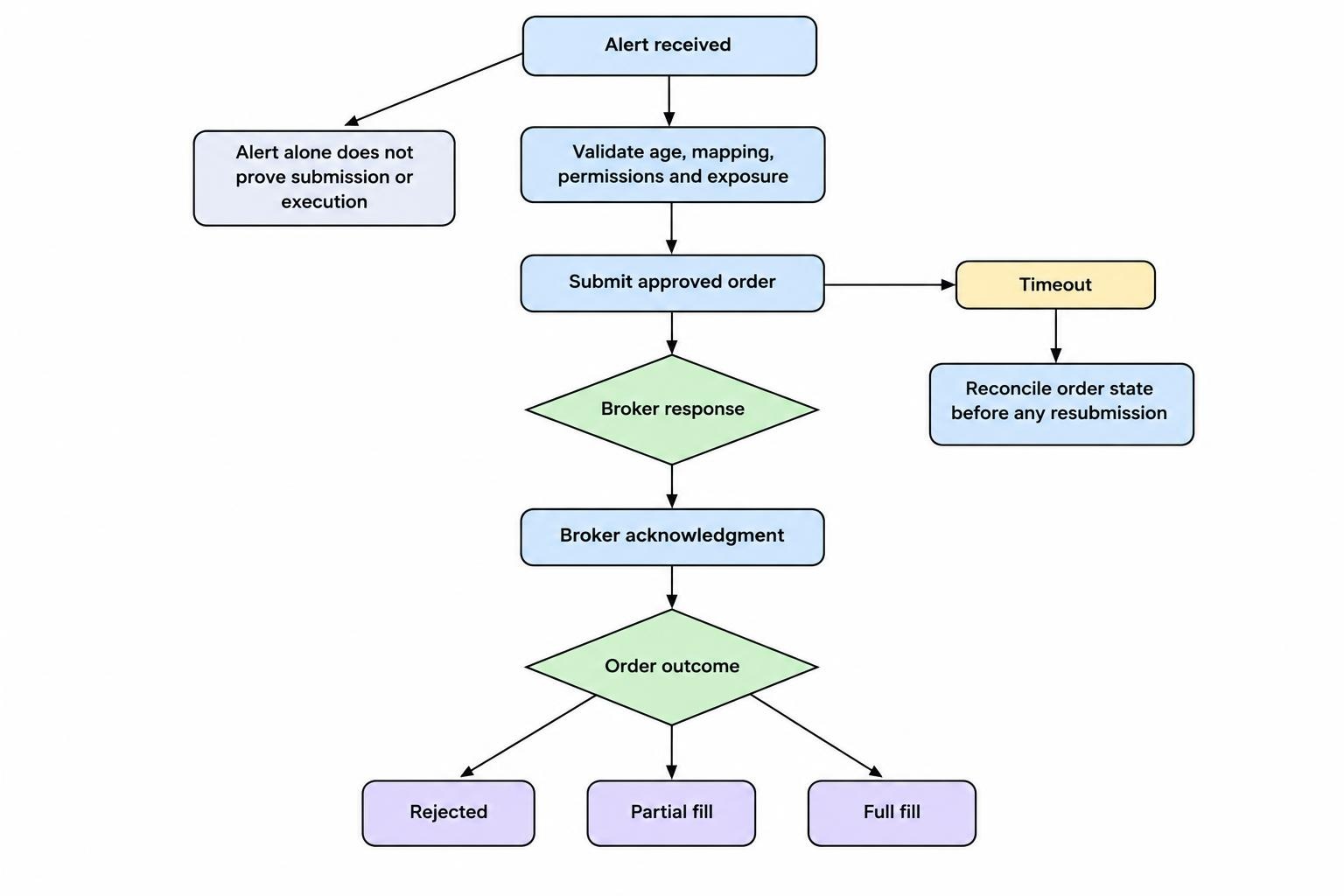
If a webhook can initiate trading, place a controlled decision stage between receipt and submission. Check event age, instrument mapping, account permissions, market session, available funds and current exposure. Reject events that are stale, malformed or inconsistent with the approved rule.
Apply pre-trade order and exposure checks independently of notification delivery. Receiving an authentic alert does not establish that the proposed trade is safe or still relevant.
Track execution separately too. Distinguish alert receipt, order submission, broker acknowledgment, rejection, partial fill and full fill. If an order request times out, investigate its state before resubmitting. An uncertain response is a reason to reconcile, not permission to send the same trade again.
Build Escalation Around Acknowledgment
For urgent operational events, define who owns the response. “Delivered” describes a transport outcome; “acknowledged” should mean a responsible person has explicitly accepted the incident for investigation. Keep resolution as a third, separate state.
Consider an illustrative procedure for a trading team: send a push notification when repeated order rejections begin, escalate by SMS if nobody acknowledges within the team’s chosen response window, then contact a backup owner if the problem remains unassigned. Set those windows around staffing and exposure, not a generic template.
A second channel does not automatically create independence. Email, push and SMS may still depend on the same alert engine, provider account or receiving device. Identify shared dependencies before calling the arrangement a fallback.
Give account-risk warnings and infrastructure failures a different escalation path from ordinary price alerts. Otherwise a watchlist full of routine notifications can bury the message that actually needs attention.
Test Failure Cases Before Relying on Alerts
A successful test notification proves only that one message worked under those conditions. Test the whole route, including what happens when a device reconnects, an endpoint rejects a request or a recipient never acknowledges.
- Delivery tests: check each enabled channel, intended recipient and device configuration.
- Expiry tests: confirm stale events are discarded or clearly labeled rather than presented as fresh.
- Receiver tests: send duplicate, malformed, unauthorized and out-of-order events.
- Escalation tests: leave an incident unacknowledged and verify the backup route.
- Recovery tests: confirm resolved incidents stop reminders without deleting their history.
Measure the stages separately: event time, alert creation, provider acceptance, receipt and acknowledgment where observable. Review slower deliveries and failures, not just average delivery time. Mark unavailable measurements as unknown rather than filling the gaps with assumptions.
Retest after changing rules, recipients, applications or infrastructure. For failures affecting the trading service itself, connect alert escalation to the broader outage communication and recovery process.
Choose the Smallest Setup That Covers the Risk
A practical starting point is push for routine watchlist conditions, email for detailed summaries, SMS for selected unresolved warnings and webhooks for structured application workflows. Adjust that arrangement to the response required and the channels you can monitor.
Before paying for more alert capacity, check active-alert limits, expiration settings, channel availability, delivery logs and routing controls. Extra capacity has little value if nobody can tell which messages require action.
The goal is not maximum notification volume. It is a clear event reaching the right recipient while it remains useful, with a defined response and an honest record of what happened next.