A trading platform failure is not just a frozen screen. It is a loss of reliable control over orders, positions or market information. The immediate problem is often uncertainty: did the order reach the broker, did it fill, and is the protective order still working?
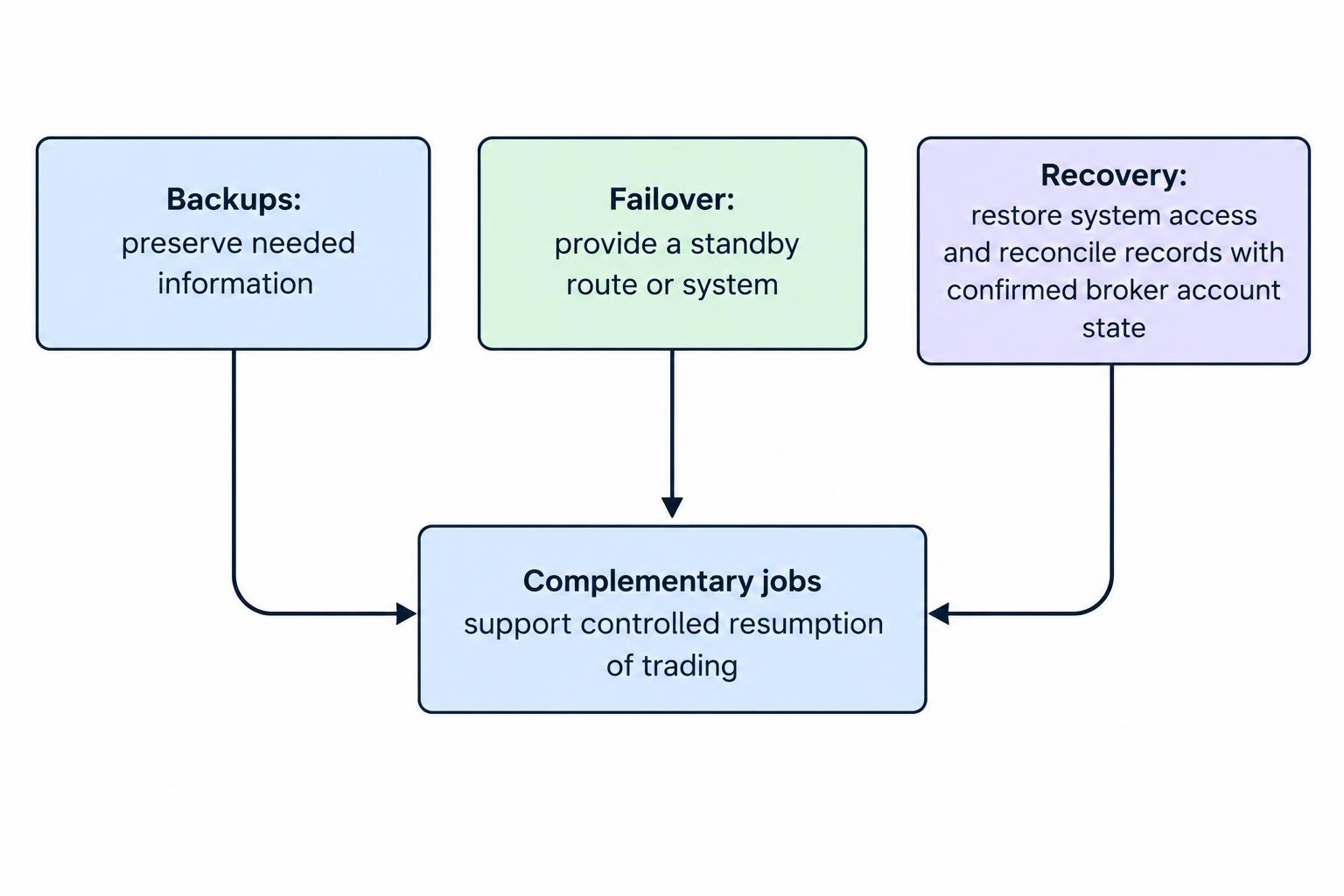
A useful recovery plan answers those questions before it tries to restore normal trading. Backups preserve information. Failover provides another operating route. Recovery brings systems and account records back into agreement. Treat them as separate jobs, with clear conditions for moving from one to the next.
The aim is not to keep trading at any cost. It is to prevent a technical fault from becoming an uncontrolled position.
Identify What Has Actually Failed
Start by separating a local problem from a broker or market problem. Restarting a desktop application may help with a local crash; it does nothing for an unavailable order gateway. Equally, switching devices is not proof that an order failed to reach its destination.
| Failure area | What to check | Recovery priority |
|---|---|---|
| Device or application | Whether another approved interface can display the account | Restore access without repeating uncertain orders |
| Power or internet connection | Router, modem, device power and an independent connection | Establish a working route to the broker |
| Market data | Quote timestamps, feed status and instrument coverage | Stop decisions based on stale information |
| Broker or order gateway | Official incident notices, order acknowledgments and dealing support | Confirm working orders and actual exposure |
| Exchange or trading venue | Official market status and instrument availability | Follow the venue’s operating instructions |
| Account authentication | Session expiry, authentication devices and approved recovery methods | Regain access without weakening account security |
Use this table as a diagnostic prompt, not a guarantee that each fault will announce itself neatly. Record which functions work: login, quotes, order entry, cancellation, execution reporting and position display. “The platform is down” is less useful than “quotes update, but cancellation requests receive no acknowledgment.”
What to Do During a Trading Platform Outage
Pause new order submissions when order status is uncertain. Repeatedly pressing Buy, Sell or Cancel is not a recovery procedure. The SEC warns that resubmitting an order without checking its execution can create duplicate trades, and that receiving a cancellation receipt does not establish that cancellation succeeded. Its online investing guidance on execution and cancellation checks addresses both risks.
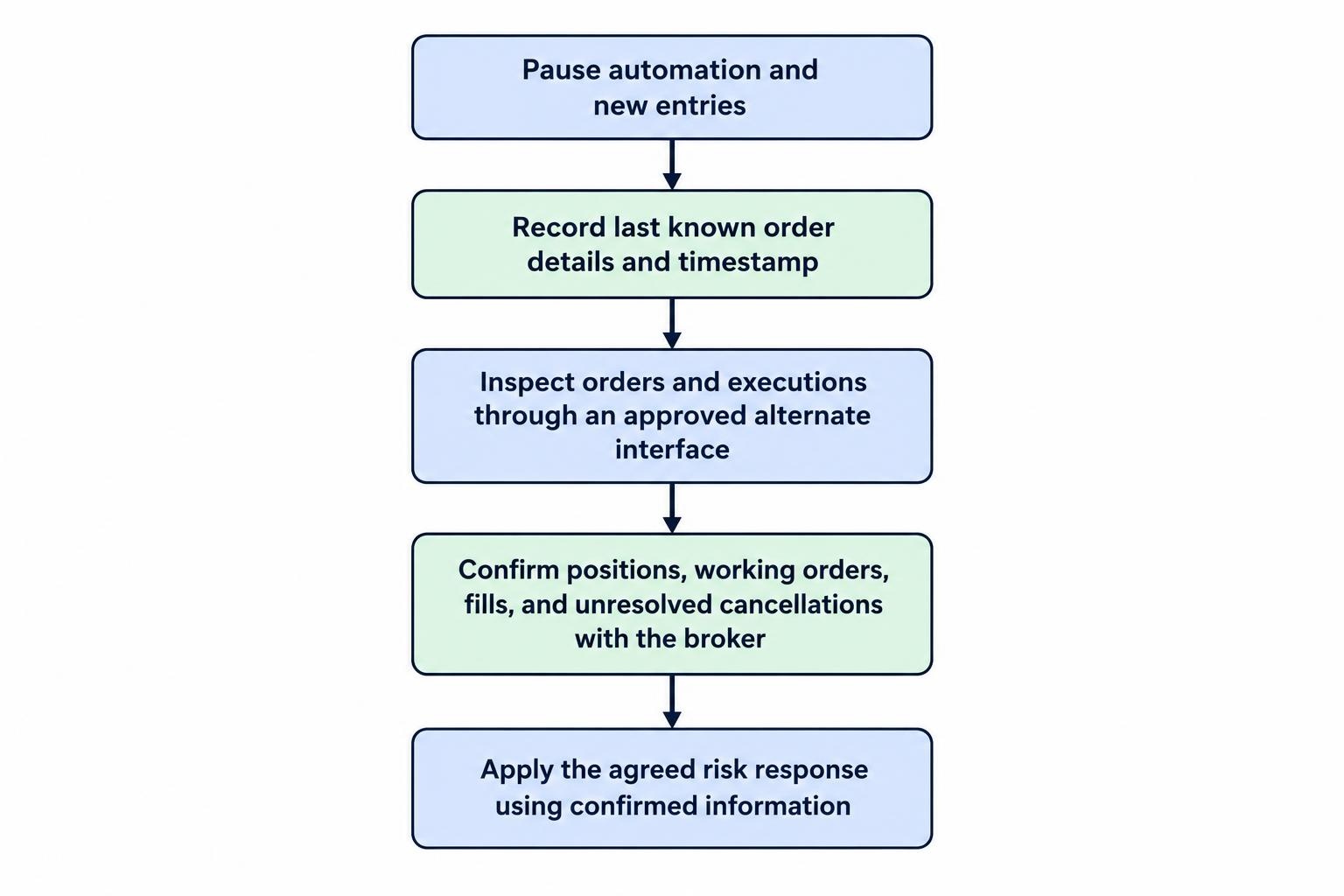
Follow a short, predetermined sequence:
- Pause automation and discretionary entries. Prevent additional instructions while you establish what happened.
- Record the last known state. Note the account, instrument, side, quantity, order identifiers and timestamp, including the time zone.
- Check an approved alternate interface. Use it to inspect orders and executions before entering replacement instructions.
- Contact the broker through a verified route. Ask for current positions, working orders, partial fills and unresolved cancellations.
- Apply the agreed risk response. Decide what to retain, cancel or close using confirmed account information.
For a trading team, assign one person authority to issue emergency instructions. Other staff can investigate, document and communicate. Several people trying to flatten the same account is a coordination failure, even if every person has good intentions.
Define these responsibilities within your wider trading system security and risk controls. The outage procedure should identify who can stop trading, who can contact the dealing desk and who can authorize a restart.
Build Backups Around Recovery Needs
A backup is useful only if it contains what you need and can be restored in time. A saved chart layout may make the screen familiar again, but it does not resolve missing execution reports.
Set Recovery Time and Data Loss Targets
Two planning measures help define the job. The recovery time objective, or RTO, sets the tolerable period of unavailability for a system resource. The recovery point objective, or RPO, identifies the point before disruption to which data must be recoverable. These definitions appear in NIST’s contingency planning guide.
Apply the measures by function rather than assigning one number to the entire trading operation. Historical research files might tolerate a slower restore. Account visibility and order control deserve separate, tighter targets based on the exposure involved.
Suppose, as a planning example, a strategy saves its local state every five minutes but submits orders between saves. Restoring the latest file leaves a gap that must be reconciled against broker records. A successful file restore is therefore not permission to restart the strategy.
Preserve Configuration and Evidence
Consider backing up strategy versions, approved settings, instrument mappings, position limits, deployment instructions and the software dependencies required to run them. Preserve order and execution logs separately from screenshots. Include timestamps and identifiers that let you match local events to broker records.
Keep recoverable copies outside the primary machine, with access controls appropriate to their contents. Include a protected copy that routine deployment or synchronization processes cannot overwrite. Keep credentials out of ordinary configuration exports; document how authorized users will retrieve them securely during recovery.
Also maintain an offline emergency sheet containing verified support numbers, account references, escalation contacts and the recovery sequence. Do not include passwords or authentication secrets. The sheet should remain useful when the main workstation and its password manager session are unavailable.
Choose Failover That Addresses the Failure
Failover means moving an operating function to a standby route or system. Choose it by the fault it is meant to handle. A spare laptop addresses a broken workstation. A separate internet connection addresses certain connectivity problems. Neither should be treated as protection against every broker outage.
For a manual trader, a practical standby arrangement might include a charged device, an approved mobile interface, tested authentication access and another network connection. Test the whole route. Being able to open an application is not the same as being able to inspect the correct account and manage its orders.
A second brokerage account requires a different assessment. Do not assume it offers control over positions held at the first firm. Treat cross-account transactions as new trading decisions with their own exposure, funding and reconciliation requirements—not as a simple replacement login.
Prevent Two Automated Systems From Taking Control
For automated trading, define how the standby instance gains authority and how the old instance loses it. Do not let a missed heartbeat alone grant two machines permission to submit orders.
Design the handover so that the old instance is stopped or blocked from order submission before the replacement becomes active. If that cannot be established, require operator approval rather than allowing an automatic restart. The recovery design should favor a visible pause over competing order senders.
Keep the standby in observation mode while it loads current account information. It should compare broker positions, working orders and recent executions with its saved state before generating fresh instructions. Detailed connection handling belongs in the procedure for broker API rate limits and connection errors; the disaster recovery plan should define when to stop reconnecting automatically and escalate.
Check What Happens to Orders After Disconnection
Before relying on an order during an outage, establish where it is held and what triggers it. Ask the broker whether each stop, trailing stop, bracket or conditional order depends on the local application, a broker service or an exchange function. Record the answer for the account and order type you actually use.
Do not assume that “cancel on disconnect” means every order disappears. CME Group’s Cancel on Disconnect configuration documentation excludes good till canceled and good till date orders from the function it describes. That is a venue-specific example of why the feature name alone is not enough.
Build the recovery checklist around confirmed outcomes: which orders remain working, which were canceled and whether any filled during the interruption. If a position is still open, verify its protection explicitly rather than relying on a remembered screen.
Distinguish stopping software from canceling orders and closing positions. They are separate actions. Your kill switch and emergency shutdown procedures should state which action each control performs, what confirmation it returns and what remains to be done afterward.
Reconcile the Account Before Restarting
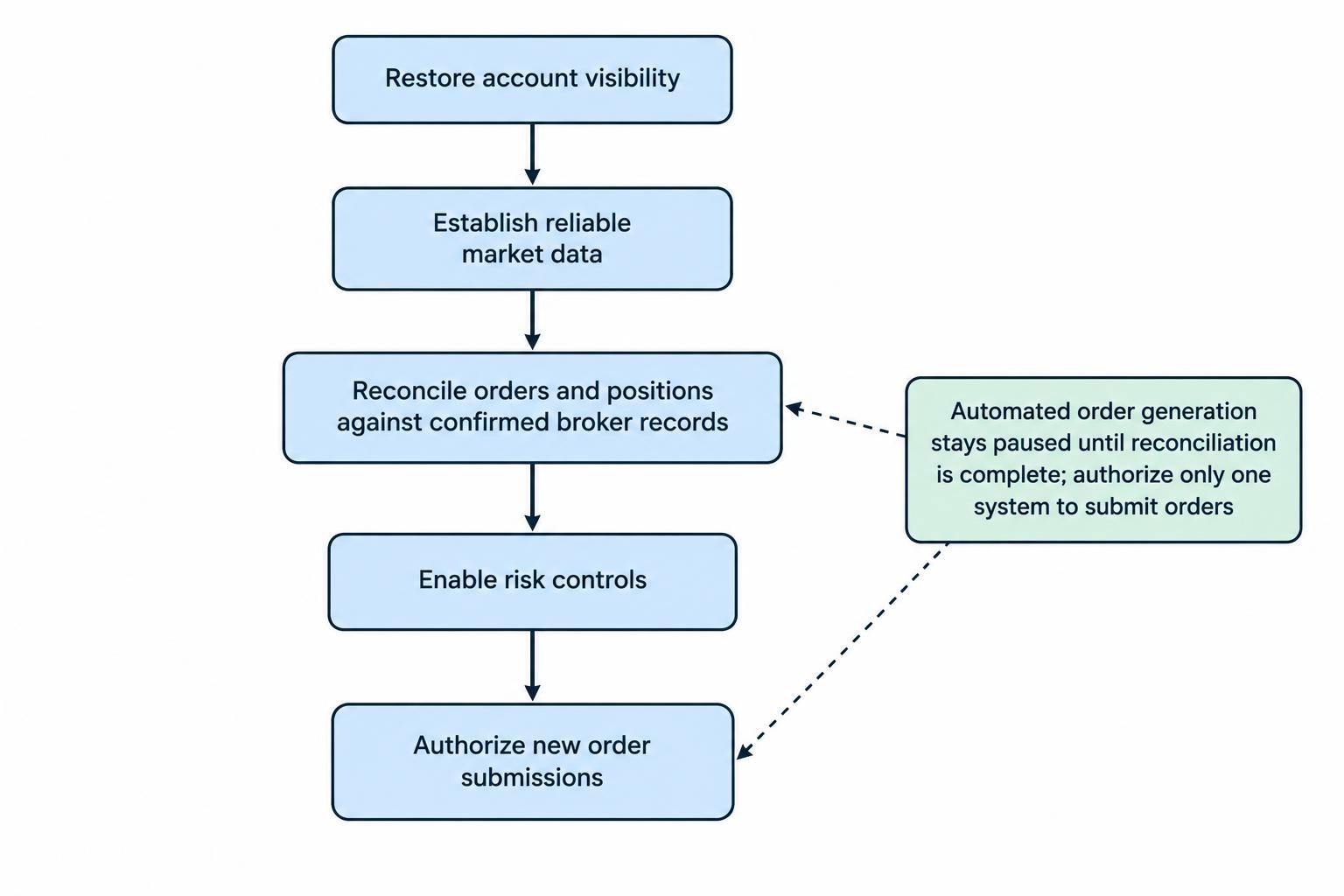
A restored connection is the beginning of account reconciliation, not the end of recovery. Keep automated order generation paused until the strategy’s state agrees with confirmed broker records.
For example, suppose a strategy submits a purchase for 100 shares and loses its connection. It records no acknowledgment. The broker later confirms a 40-share partial fill with 60 shares still working. Repeating the original 100-share instruction could create exposure beyond the intended target. Recovery must account for both the executed quantity and the remaining order.
Compare positions by instrument, quantity and direction. Then check working orders, cumulative fills, unresolved cancel or replace requests, and any protective orders linked to the position. Investigate discrepancies individually; do not overwrite the local state simply because one screen looks newer.
For systems that support client order identifiers or duplicate-request protection, document the broker’s exact behavior before using those features in recovery. An identifier should help trace an instruction, not become an excuse to resend it without checking.
Resume in stages: restore account visibility, establish reliable market data, reconcile orders and positions, enable risk controls, then authorize new submissions. Keep the primary system disabled if the standby has taken control. Returning to the primary system later should be another controlled handover.
Keep Outage Communication Separate From Trading Access
Save emergency contacts somewhere other than the affected platform. Document dealing desk availability, account verification requirements, supported telephone instructions and escalation routes before an incident. Ask whether any alternate service requires advance enrollment or separate permissions.
For U.S. FINRA member firms, FINRA Rule 4370 on business continuity plans requires written continuity planning, annual review and updates following material changes. Its requirements include applicable provisions for data recovery, mission critical systems and alternate customer communications. The rule also requires customer disclosure of the firm’s response to disruptions; it does not establish a universal platform restoration deadline.
Read that disclosure as part of preparation. Translate it into practical questions: who can confirm an order, what route works if login fails, and where will the firm publish incident updates?
During an outage, distinguish confirmed facts from estimates. “Login is available” does not establish that order entry and execution reporting are healthy. The procedure for outage communication between brokers, exchanges and traders should keep those service states separate.
Test Recovery, Then Set Clear Restart Conditions
Use a simulation or approved test environment to rehearse a lost connection after submission, a partial fill during failover and a cancellation without confirmation. Test expired authentication access and unavailable support channels too. These exercises should answer whether the operator can regain control, not just whether the spare device switches on.
Measure the time needed to detect the fault, pause submissions, establish another route and reconcile the account. Record missing permissions, outdated contacts and steps that required guesswork. Repeat the relevant tests after platform, strategy, authentication or infrastructure changes.
Before restarting live activity, require confirmed positions, resolved order discrepancies, working risk controls and a single authorized order sender. Preserve the incident timeline and logs before routine processes replace them.
A sound trading platform recovery plan ends with a known account state and controlled trading authority. Getting the charts moving again is useful. Knowing exactly what you own—and what can still execute—is the real recovery.