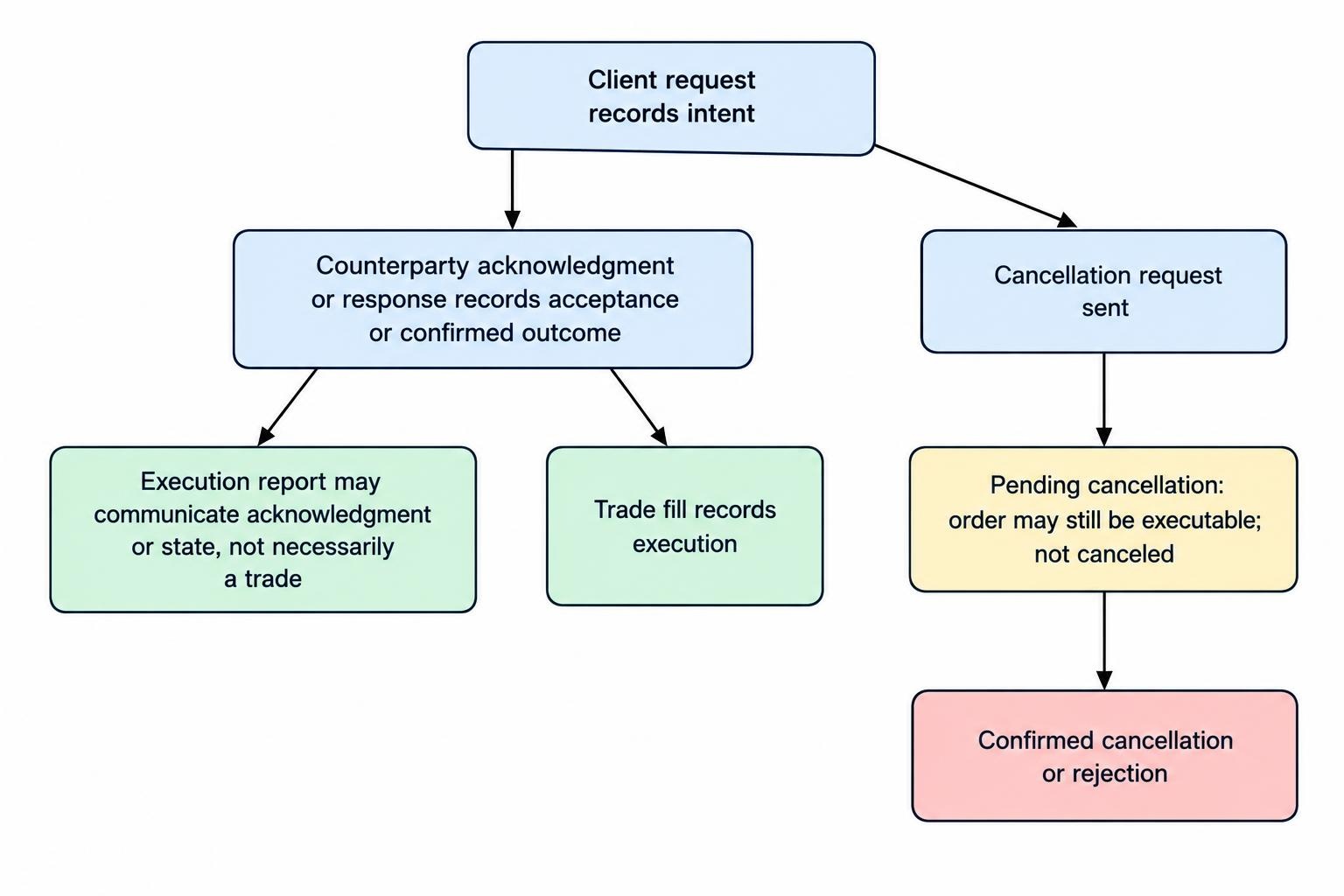
FIX order messages carry instructions to a broker or trading venue. Execution reports carry acknowledgments, fills and changes to order state back to the sender. The distinction matters: sending a cancellation request does not cancel an order, and receiving an execution report does not necessarily mean a trade occurred.
A reliable order management system must track three things separately: what it requested, what the counterparty accepted, and what actually traded. Mixing those records can create duplicate orders, incorrect positions or a screen that says “canceled” while an order remains executable.
This guide covers the messages, identifiers and quantity fields used to follow an order through its lifecycle. For the broader connection and messaging structure, see FIX protocol communication between trading systems.
The Main FIX Order Messages
The MsgType(35) field identifies a message’s function. A small set of application messages handles much of the ordinary single order workflow.
| Message | MsgType(35) | Purpose |
|---|---|---|
| NewOrderSingle | D | Submit a new order. |
| ExecutionReport | 8 | Report acceptance, rejection, execution information or order state. |
| OrderCancelRequest | F | Request cancellation of the remaining order quantity. |
| OrderCancelReplaceRequest | G | Request an amendment, such as a price or quantity change. |
| OrderCancelReject | 9 | Reject a cancellation or replacement request. |
| OrderStatusRequest | H | Request the current status of an identified order. |
These are protocol definitions, not a promise that every connection supports every message. The counterparty’s application specification determines supported order types, required fields and response behavior. Nasdaq’s FIX interface specification, for example, lists OrderStatusRequest among its unsupported messages. Build against the agreed interface rather than assuming the entire FIX dictionary is available.
Order Identifiers: Which Request Does a Report Belong To?
Order handling needs more than one identifier because an order, an amendment request and an execution report are different records.
ClOrdID and OrigClOrdID
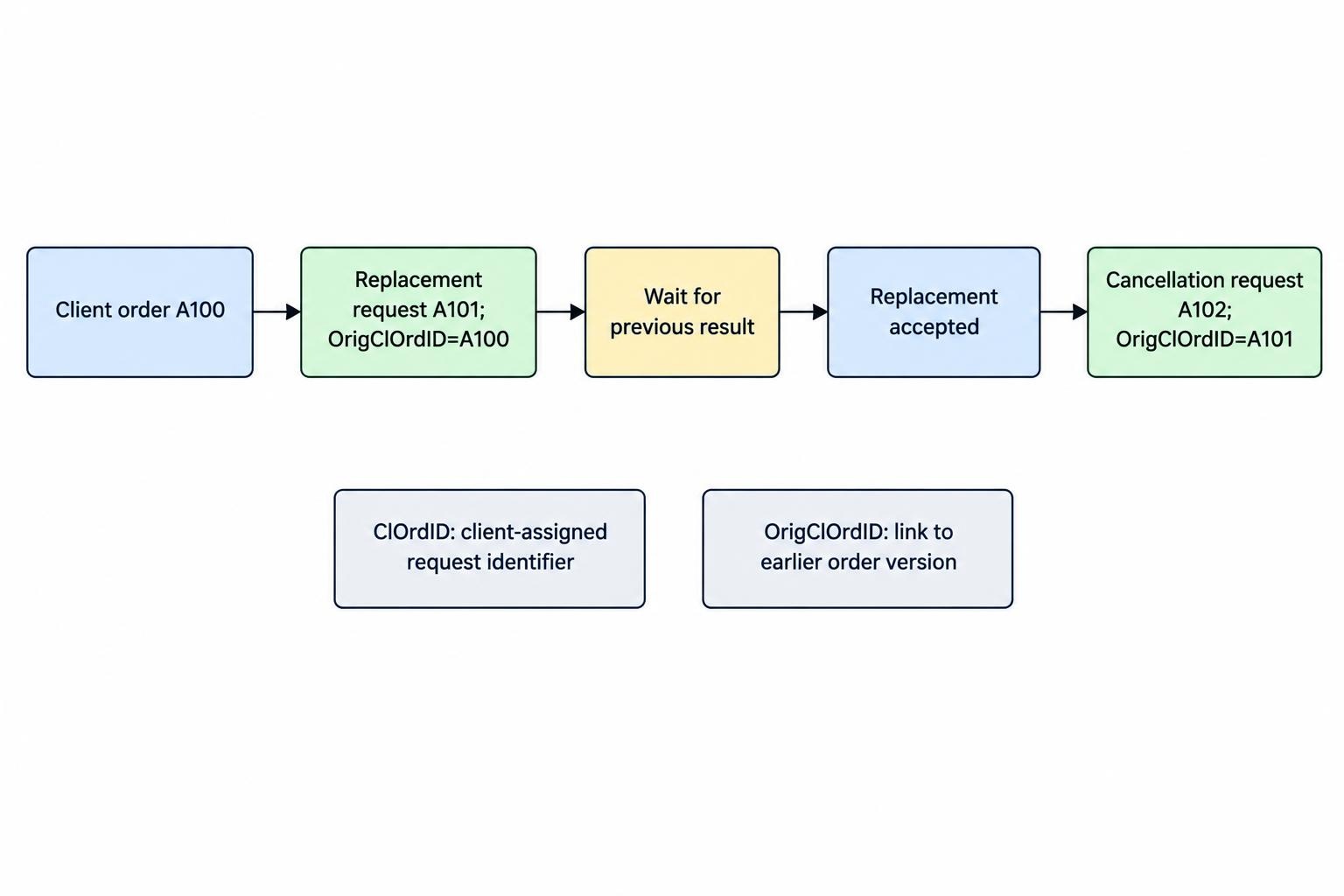
ClOrdID(11) is the client assigned identifier. A new order receives a ClOrdID, and subsequent cancellation or replacement requests receive their own identifiers. OrigClOrdID(41) connects a request to the earlier order version it addresses.
Consider a sequential workflow. A client submits order A100, then requests a replacement using A101 with OrigClOrdID A100. Once that replacement is accepted, a cancellation request A102 refers to A101. Continuing to point every request at A100 would lose the accepted replacement chain.
Keep the example’s assumption in view: each request waits for the previous result. Sending several amendments before receiving responses introduces more complicated chaining rules. A conservative implementation should allow only one outstanding amendment unless the interface explicitly supports another approach.
OrderID and ExecID
OrderID(37) is assigned by the receiving broker or venue. Store it alongside the client identifier chain; do not assume it changes with every amendment.
ExecID(17) identifies an execution report within the counterparty’s defined scope. Despite its name, it is not necessarily an identifier for a fill alone. An acknowledgment can also carry an ExecID.
Design storage around separate order, request and report records. Preserve all identifiers rather than overwriting the previous ClOrdID whenever a replacement succeeds. That history makes it possible to explain which instruction a rejection addressed.
ExecType and OrdStatus Answer Different Questions
An ExecutionReport contains two fields that should never be treated as interchangeable:
- ExecType(150): Why was this report sent?
- OrdStatus(39): What is the order’s current reported state?
In FIX 4.4 style reporting, 150=F identifies a trade event. The same report can carry 39=1 for Partially Filled or 39=2 for Filled. The event is a trade in both cases; the resulting order state differs.
A replacement acknowledgment makes the distinction equally clear. ExecType can be Replaced while OrdStatus remains Partially Filled because earlier executions still belong to the order chain. The FIX application specification for orders and executions separates report purpose from order state and defines precedence when several states apply.
Pending Cancel takes precedence over Partially Filled. Consequently, a report can communicate another fill while retaining Pending Cancel as the order status. A single status label cannot describe every fact about the order.
Version differences also matter. FIX 4.2 uses Partial Fill and Fill ExecType values in workflows where later versions use Trade. Avoid copying tag values from an example without checking its application version and the counterparty’s conventions.
Reading Quantities Without Double Counting
The quantity fields describe different parts of the execution history. Confusing a cumulative total with a new fill is an easy way to manufacture a position that never existed.
OrderQty(38) represents the order quantity. CumQty(14) is the cumulative executed quantity, and LeavesQty(151) is the quantity remaining open for execution. LastQty(32) describes the quantity associated with the reported fill.
For an ordinary active order, the expected relationship is OrderQty = CumQty + LeavesQty. Treat this as a contextual validation check, not an equation that every report must satisfy. An unfilled remainder can be canceled or expire, leaving LeavesQty at zero without CumQty reaching OrderQty.
Suppose a 1,000 share order receives fills of 200 and 300 shares. The second fill report has LastQty 300 and CumQty 500. Adding both cumulative values would produce 700, which is wrong. Either update a properly deduplicated execution ledger from fill events or reconcile against cumulative quantities; do not mix the two calculations casually.
LastPx(31) gives the reported fill price. AvgPx(6), where provided, describes the average execution price across the relevant fills. For shares executed at different prices, use a quantity weighted average rather than an average of the price values alone.
A Worked Order Lifecycle
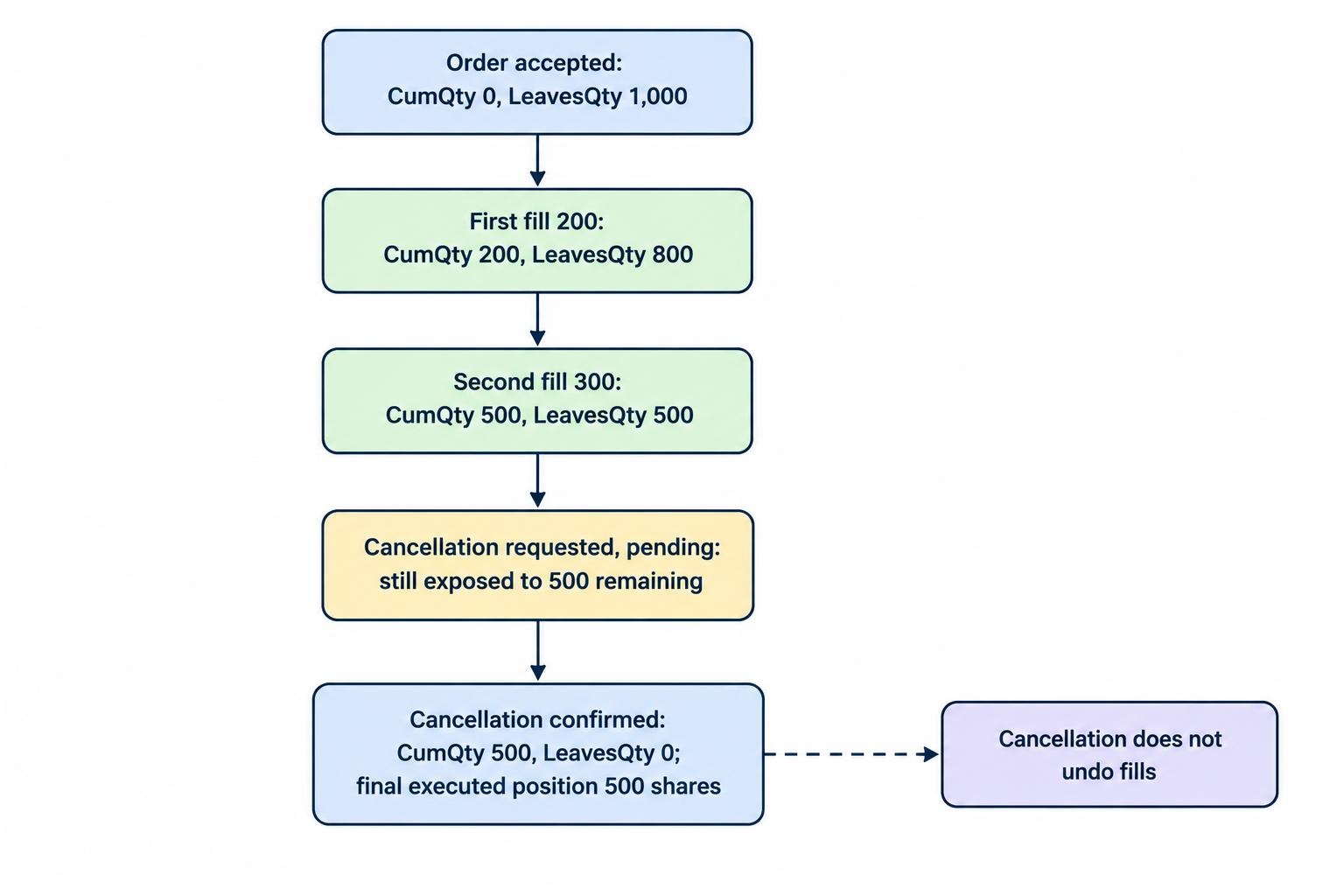
The following hypothetical example uses FIX 4.4 style execution reporting. A client submits a limit order to buy 1,000 shares at $25.00, receives two partial fills, then cancels the remainder. It illustrates application behavior rather than complete messages ready for transmission.
| Step | Message or event | ExecType / OrdStatus | CumQty | LeavesQty |
|---|---|---|---|---|
| 1 | Client sends NewOrderSingle | Not applicable | Not yet confirmed | Not yet confirmed |
| 2 | Counterparty accepts order | New / New | 0 | 1,000 |
| 3 | 200 shares execute at $25.00 | Trade / Partially Filled | 200 | 800 |
| 4 | Another 300 shares execute at $25.00 | Trade / Partially Filled | 500 | 500 |
| 5 | Cancellation request acknowledged as pending | Pending Cancel / Pending Cancel | 500 | 500 |
| 6 | Remaining quantity canceled | Canceled / Canceled | 500 | 0 |
The final position is 500 shares, not zero. Cancellation removes the remaining executable quantity; it does not reverse completed trades. A user interface should retain the executed amount beside the canceled status so that the label does not hide the position.
Order submission should also remain separate from authorization. A valid NewOrderSingle message can still represent an unacceptable trade. Apply pre-trade order and exposure checks before releasing the instruction.
Cancellation Races and Replacement Requests
Pending Cancel Is Not Canceled
A cancellation request can cross an execution report in transit. The order may trade before the receiver processes the request, or a previously completed execution may reach the client after the cancellation was sent.
Nasdaq Canada’s FIX 4.2 application notes and order lifecycle examples show executions occurring during cancellation processing. The practical rule is straightforward: retain the order’s remaining exposure until a confirmed outcome resolves it.
A pending acknowledgment is not mandatory in every successful sequence. A counterparty may respond directly with a cancellation confirmation or a rejection. Do not require Pending Cancel as an intermediate step before accepting a valid final response.
A Replacement Changes the Accepted Order
OrderCancelReplaceRequest requests an amendment; sending it does not immediately change the live order. Keep both the accepted parameters and the requested parameters until the response resolves the amendment.
For an ordinary cumulative quantity workflow, reducing a 1,000 share order to 700 after 300 shares have executed leaves 400 shares open if accepted. OrderQty describes the amended total, not a fresh instruction to buy another 700 shares.
If another fill arrives before acceptance, process it against the currently accepted version. Do not retroactively apply the requested price to an execution that occurred under the old instruction.
Rejections: Identify What Failed
A rejected new order and a rejected cancellation require different reactions. A new order rejection reports failure of the submitted order. An OrderCancelReject reports failure of a cancellation or replacement request; it does not automatically reject or terminate the underlying order.
Read the request identifiers, reported OrdStatus and rejection reason together. CxlRejReason(102) helps classify a failed cancellation or replacement, while CxlRejResponseTo(434) distinguishes the request category. OrdRejReason(103), when supplied, describes an order rejection.
A session Reject or BusinessMessageReject addresses another layer of failure. Do not convert every message containing “reject” into the same terminal order state.
For operations staff, display both the failed request and the last confirmed order state. “Replacement rejected; original order remains partially filled” is more useful than a red “Rejected” badge with no explanation.
Status Requests, Replays and Trade Corrections
Where supported, OrderStatusRequest obtains a status report rather than placing another order. A status response is a snapshot, not a new fill to add to positions. Keep status reconciliation separate from execution booking.
Connection recovery introduces another distinction. MsgSeqNum(34) belongs to session sequencing; it is not an order identifier. PossDupFlag(43) marks a possible duplicate transmission. The FIX session layer specification defines sequence recovery and retransmission behavior.
Build processing so that replaying an already applied report does not apply its economic effect again. Use persistent report records and identifiers within their documented scope. Do not discard every possible duplicate indiscriminately: a retransmission may contain a report the application genuinely missed.
Trade corrections also need deliberate handling. Trade Cancel reverses a reported execution; Trade Correct amends one. In later FIX versions these use ExecType H and G, with ExecRefID linking to the affected report. Neither is the same as canceling an open order.
After a disconnect, avoid submitting a replacement order simply because the screen lacks an acknowledgment. Reconcile uncertain orders through the supported recovery process. Wider restart procedures belong in the trading platform failover and recovery plan.
Testing the Order State Model
Test sequences, not just individual messages. A parser can accept every field correctly while the application still books a replay twice or closes an order on a pending cancellation.
A useful test set includes partial fills, immediate fills, cancellation races, rejected amendments, fills during replacement processing, duplicate reports and corrections received after an apparently completed order. Verify positions and open exposure after every event, not only the final status label.
Persist accepted order parameters, outstanding requests and execution history separately. Flag contradictions for review rather than silently forcing them into a convenient state. For ongoing operation, connect these checks to automated trading monitoring and failure detection.
The governing principle is simple: a request records intent, an acknowledgment records acceptance, and a fill records execution. A sound FIX implementation preserves all three, even when they arrive in an inconvenient order.