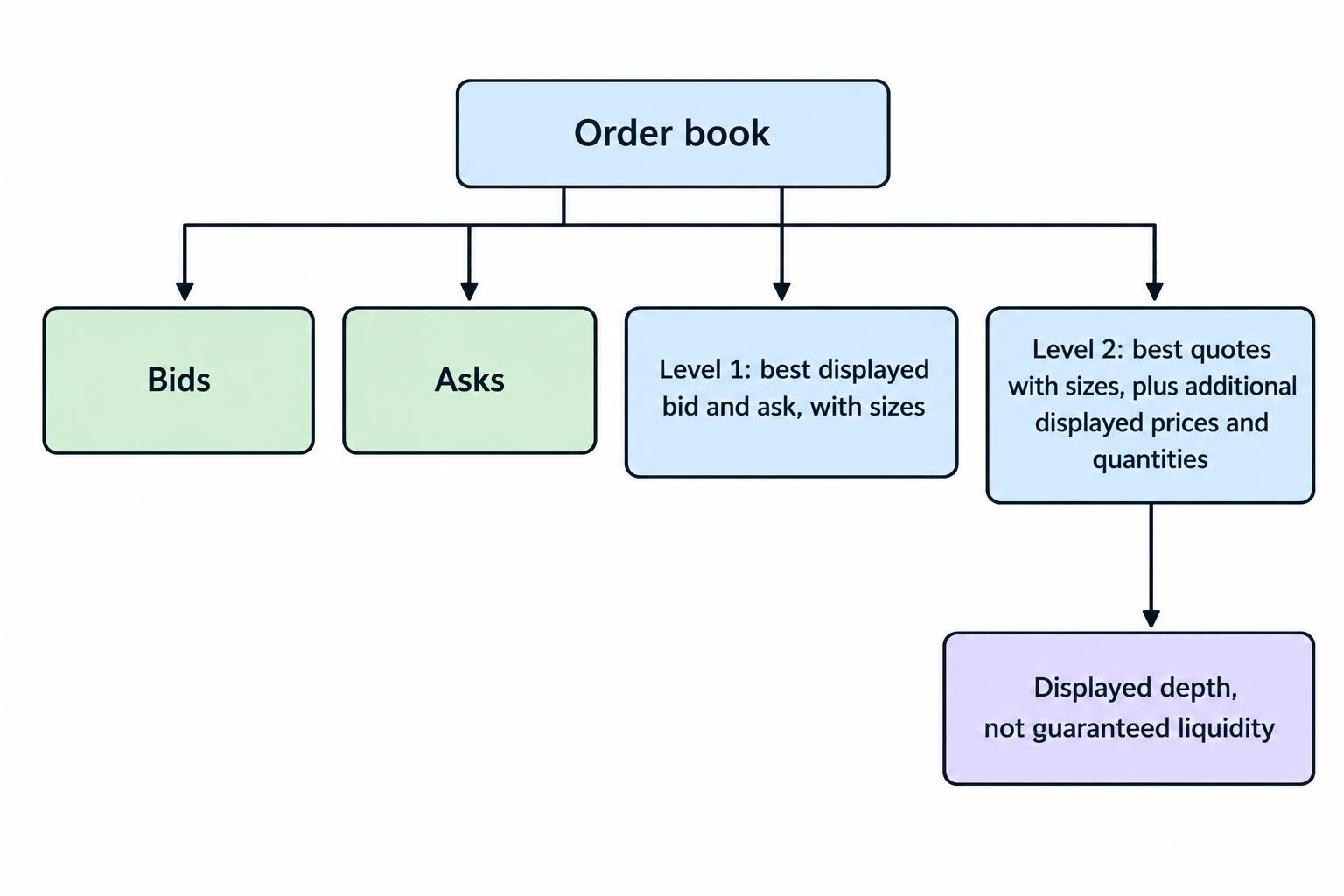
Level 1 market data shows the best displayed bid and ask, usually alongside their sizes and recent trade information. Level 2 adds depth: buying and selling interest beyond the best prices, sometimes organized by price level and sometimes by market participant.
The practical difference is visibility. Level 1 helps you assess the current spread and top quote. Level 2 helps you assess how much displayed liquidity sits around that quote. Neither guarantees your execution price or tells you where the market will move next.
Before paying for either, check what the subscription actually includes. “Level 2” is a category label, not a promise of every order across every exchange. Coverage, update frequency and the way orders are grouped matter more than the number on the package.
Level 1 vs Level 2: The Main Differences
| Feature | Level 1 | Level 2 |
|---|---|---|
| Bid and ask prices | Best displayed prices within the feed’s coverage | Best prices plus additional displayed quotes or price levels |
| Displayed size | Quantity at the best bid and ask | Quantities at multiple prices or against participant quotes |
| Order book detail | Top of book | Greater depth, depending on the product |
| Participant information | Depends on the feed | May show exchange or market participant identifiers |
| Main use | Checking quotes, spreads and basic execution conditions | Assessing displayed liquidity and planning execution |
| What it cannot guarantee | A fill at the displayed price | That displayed orders will remain available |
Exchange products illustrate these distinctions. NYSE BBO supplies best bid and ask quotations, while NYSE OpenBook products provide depth information. The NYSE real-time data product descriptions also distinguish event-based feeds from periodic snapshots. Two screens displaying depth can therefore deliver quite different information.
What Level 1 Market Data Shows
A Level 1 quote answers a narrow but useful question: what are the best displayed buying and selling prices in this feed right now?
The bid is the highest displayed buying price. The ask, also called the offer, is the lowest displayed selling price. Their difference is the bid–ask spread. Bid size and ask size show the quantities displayed at those prices, using the units defined by the feed or platform.
A typical quote window also includes the last trade price, last trade size, session volume and daily price range. These fields describe different things. A quote represents available displayed interest; a last trade records a transaction that has already happened.
A Simple Level 1 Example
Suppose a stock shows a $50.00 bid for 400 shares and a $50.02 ask for 300 shares. The spread is $0.02. A buyer can see 300 shares offered at the best displayed ask, but Level 1 does not show the selling interest above $50.02.
That distinction matters if the buyer wants 1,000 shares. The top quote does not establish the price available for the remaining 700 shares. Even the displayed 300 shares could trade or be canceled before the order arrives.
A market order does not guarantee an execution price, and the last traded price need not be the next fill price. A limit order controls the acceptable price but may remain unfilled. The SEC’s explanation of stock order types sets out that trade-off.
What Level 2 Adds
Level 2 moves beyond the top quote. It can show bids below the highest bid and offers above the lowest ask, allowing you to inspect how displayed quantity is distributed.
However, the term has different uses. A participant-based display may show each participant’s best quote, rather than every order they have entered. A price ladder may combine quantities at each price. A fuller order feed may provide individual order details.
Do not assume these formats are interchangeable. Ten participant quotes are not necessarily ten different price levels, and ten price levels are not necessarily the full book.
Market by Price vs Market by Order
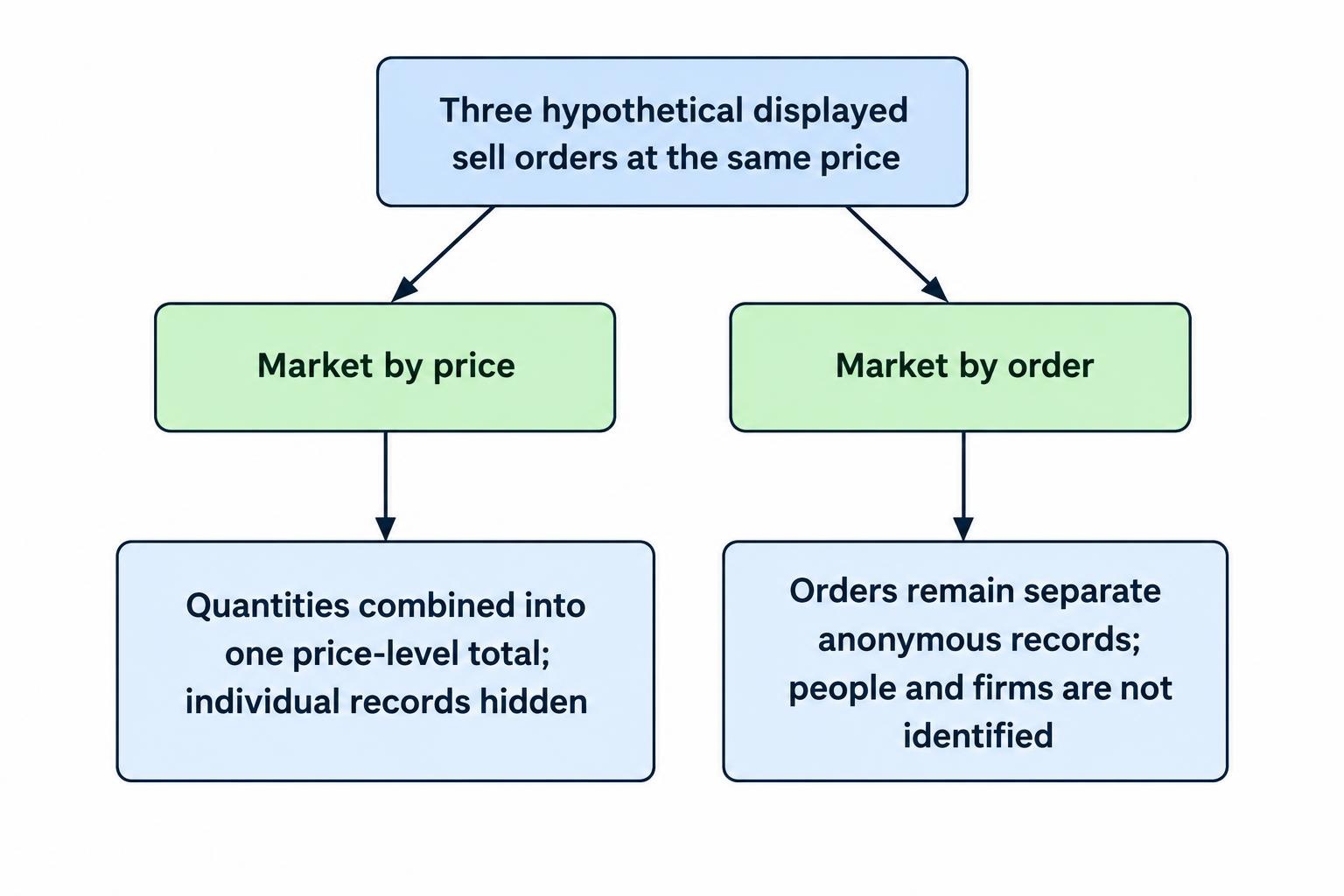
Market by price groups displayed quantity at each price. If several orders together offer 2,000 shares at $50.05, the screen may show one row containing that total.
Market by order provides individual order records. This offers more detail about book composition and can support queue analysis, but it does not necessarily identify the people or firms behind those orders.
CME’s distinction is explicit: its market by price format aggregates quantity across up to ten price levels, while market by order provides anonymous individual orders across all price levels. The CME market by order documentation also explains why aggregate depth alone cannot establish an individual order’s queue position accurately.
Reading a Level 2 Order Book
Consider this hypothetical stock order book. All sizes are shares, the view covers one venue, and the example excludes fees and any change in available orders.
| Bid size | Bid price | Ask price | Ask size |
|---|---|---|---|
| 400 | $50.00 | $50.02 | 300 |
| 800 | $49.99 | $50.03 | 500 |
| 1,200 | $49.98 | $50.05 | 1,000 |
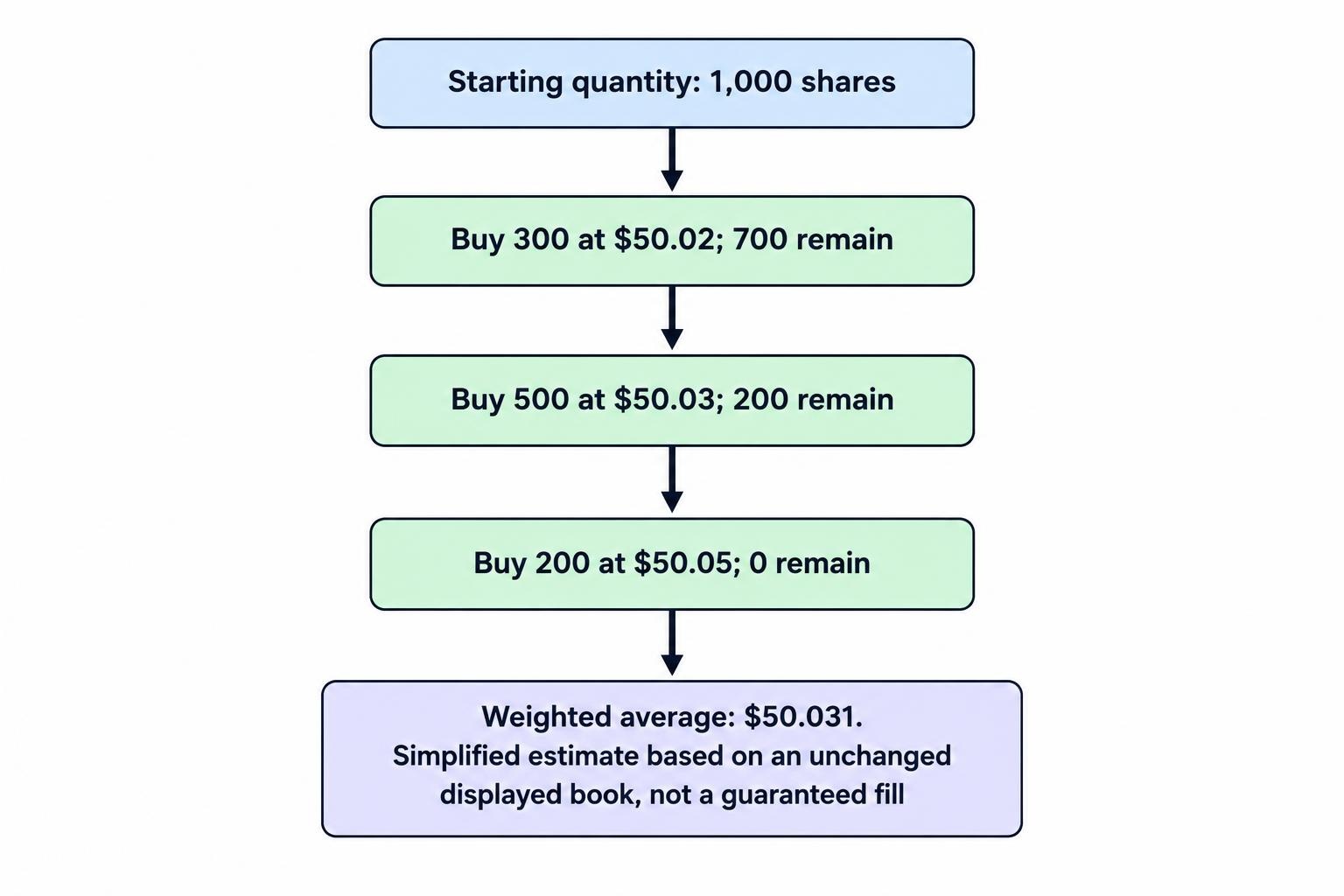
A purchase of 1,000 shares that consumed this unchanged displayed book would take 300 shares at $50.02, 500 at $50.03 and 200 at $50.05. The weighted average purchase price would be $50.031.
That is $0.011 per share above the initial best ask, or $11 across the order. Level 1 shows the starting offer. Level 2 supplies the additional prices and sizes needed for this simplified estimate.
Now consider a buy limit order for 1,000 shares at $50.03. Under the same assumptions, it could buy 800 shares immediately. The remaining 200 shares would not execute above the limit. Whether they rest in the book or are canceled depends on the order instructions.
Use this arithmetic to frame execution choices, not predict a guaranteed fill. Actual results also depend on routing, other venues, competing orders and what changes before arrival. The broader guide to market data for trading systems covers how quotes and trades fit into the rest of a trading setup.
Why Level 2 Does Not Show the Entire Market
Full Depth Still Has a Boundary
“Full depth” usually refers to the displayed book covered by a product. It does not automatically mean every venue trading the instrument.
For example, Nasdaq TotalView’s coverage description includes full order book depth for securities trading on Nasdaq, including stocks listed on other exchanges. A stock’s listing exchange and the venue holding a displayed order are different facts.
Check whether your screen covers one venue, several venues or a consolidated quotation feed. A deep view of one book should not be treated as a complete view of liquidity everywhere.
Displayed Quantity Is Not Total Trading Interest
Some orders reveal only part of their total quantity. After the visible portion trades, more quantity can replenish the display. CME’s display quantity order instructions describe this behavior directly.
This helps explain why more volume may trade at a price than appeared available in an earlier snapshot. New orders can also arrive. A replenishing offer is not proof that one identifiable seller has an enormous position.
A Large Order Is Not a Forecast
A large displayed bid shows buying interest at that moment. It does not establish that the price cannot fall. The order may execute, change or disappear.
Compare the display with completed trades. Did selling actually meet the bid? Did the size replenish after executions, or vanish without much trading? Those questions are more useful than treating a large green number as a buy signal.
Keep the distinction plain: depth shows displayed orders; time and sales shows completed transactions. They answer different questions, and neither reads anyone’s mind.
Depth and Speed Are Separate Decisions
Level 1 does not mean delayed, and Level 2 does not mean instantaneous. One describes the information supplied; the other concerns when it reaches you.
Before relying on a quote window, confirm whether it streams updates or requires refreshes, whether the platform batches changes, and what its timestamps represent. Exchange event time, vendor receipt time and screen display time should not be treated as identical.
A depth screen can look busy while still being unsuitable for a fast execution decision. Compare real-time and delayed market data separately from the choice between top of book and depth. More rows do not compensate for stale information.
Does Level 2 Mean the Same Thing Across Markets?
No. Identify the underlying trading venue before comparing subscriptions. For stocks, inspect which exchanges and quotation feeds are included. For futures, inspect the contract, exchange, depth format and number of levels supplied.
Spot foreign exchange needs particular care. Trading is spread across dealers, venues and liquidity pools, rather than represented by one universal order book. The BIS analysis of fragmented FX execution documents this structure. A depth display should therefore be interpreted within its stated provider and venue coverage, not as the entire currency market.
The useful comparison is not “does this platform have Level 2?” It is “which executable prices and quantities does this feed represent, and can my orders reach them?”
When Is Level 1 Enough?
Level 1 is a reasonable starting point when your decisions do not depend on book depth. Consider a trader placing a small limit order whose main concern is avoiding an unacceptable price. Top quotes may provide enough context without another subscription or another flashing window.
For a strategy based on daily or weekly prices, ask what action additional depth would change. If the answer is none, the purchase has little justification. More information creates work as well as opportunities.
Level 2 deserves closer assessment when order size, short holding periods or thin displayed liquidity make execution conditions part of the strategy. Its value should come from better decisions about price, timing or quantity—not from making the workstation look busier.
What to Check Before Buying Level 2
Ask the provider for the feed names and coverage details, rather than accepting the package label alone. A short checklist keeps the comparison practical:
- Coverage: Which venues, instruments and trading sessions are included?
- Granularity: Are quotes grouped by participant, price or individual order?
- Depth: How many levels are delivered, and how many can the screen display?
- Delivery: Are updates streamed, batched or supplied as snapshots?
- Access and cost: What is the total subscription charge, and does the agreement cover your intended screen or API use?
Product names can also change. Nasdaq’s depth product retirement notice states that Nasdaq Level 2 and TotalView Aggregated are scheduled to run until July 2, 2027, with retirement pending SEC review. That concerns named Nasdaq products, not the disappearance of “Level 2” as a general market data term.
Choose Data That Changes a Decision
Evaluate depth against a defined task. Record whether it changes your order price, order size or decision to wait. Then review execution prices, partial fills, unfilled orders and subscription costs across a representative set of trades.
For automated strategies, make sure the research data supports the logic being tested. Historical candles cannot recreate the order sequence or displayed book that a depth-based rule requires. The guide to backtesting an automated trading strategy addresses that broader testing process.
Level 1 provides the top quote. Level 2 adds context around it. Choose the smallest data package that supports your decisions reliably, and upgrade when you can name the problem the extra detail will solve.