Protecting a trading account means securing more than its login screen. Email recovery, saved sessions, API credentials and connected applications all deserve attention. Treat each as a separate access route, rather than assuming a strong password covers everything.
The practical goal is to restrict who can enter, what they can do and how quickly their access can be removed. For an automated setup, that means protecting both the person operating the account and the software submitting orders. This guide covers those access controls; the broader trading system security and risk controls framework also addresses order checks, shutdown procedures and recovery.
Map Every Route Into Your Trading Account
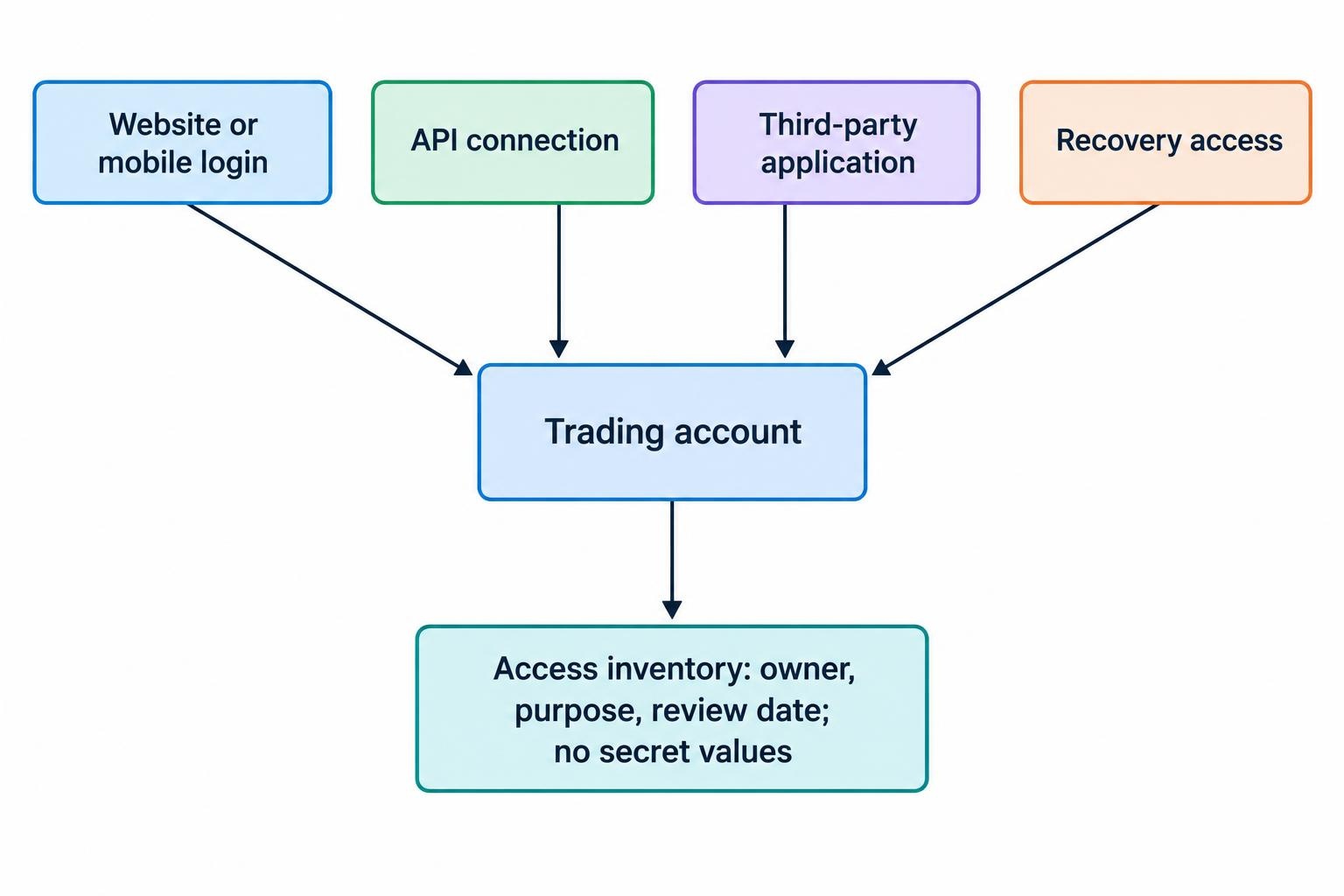
Start with an access inventory. Record the devices, applications and people you have authorized, including old integrations you no longer use. Keep this inventory separate from the actual secrets: it should describe access, not become another file full of passwords.
| Access route | What to check | Preferred arrangement |
|---|---|---|
| Website and mobile login | Password, authentication methods, trusted devices and recovery details | Individual access with strong authentication and a tested recovery route |
| API connection | Credential owner, permissions, application and revocation procedure | A separate credential for each application and environment |
| Third-party application | Approved account access, stored information and disconnection options | Only the access needed for its stated purpose |
For a small setup, the inventory might contain a trading laptop, mobile app, reporting service and execution bot. Give each an owner and review date. If you cannot explain why an integration still needs access, investigate before keeping it connected by default.
Use Separate Passwords and Protect Recovery Access
Use a different, randomly generated password for each trading account, email account and supporting service. Store passwords in a reputable password manager, protected by a strong master passphrase and strong authentication. Avoid variations on the same password: changing the number at the end is not meaningful separation.
Routine password changes are not a substitute for strong credentials. Change an exposed or suspected compromised password promptly, and follow any applicable account requirements. NIST’s digital identity guidelines support password managers and autofill, and reject arbitrary periodic password changes for systems following those guidelines. They are not a blanket legal requirement for every trading provider.
Give recovery access the same attention as the trading login. Review the email address and phone number registered to the account, remove obsolete recovery details and check how you would regain access after losing a device. Where available, protect your mobile carrier account against unauthorized number transfers.
Keep an offline record of the provider’s verified support contact and your account identifier. Do not include your password. During an incident, you need a reliable way to reach support without searching through a suspicious message.
Choose Phishing-Resistant Authentication Where Available
Enable multifactor authentication, but examine the method rather than stopping at the checkbox. Where supported, prefer a FIDO passkey or FIDO security key. Passkeys use cryptographic credentials associated with the legitimate service, rather than a password or code that you type into a page. The FIDO Alliance’s passkey documentation describes their phishing resistance and the distinction between synced and device-bound passkeys.
Authenticator codes remain phishable: a fraudulent page can ask for a code and relay it to the real service. Never disclose codes to someone claiming to be support, approve an unexpected login request or register an authenticator under a caller’s direction.
Prepare for a Lost Phone or Security Key
Before relying on a new authentication method, establish its backup. Register another supported authenticator where possible and store recovery codes securely, away from the device they are meant to replace. Protect the account that manages synced passkeys, too.
Test your backup with a normal login before removing an older method. The question is practical: if your phone disappears while you have open positions, can you reach the account or verified support without improvising?
Do not treat stronger authentication as permission to relax elsewhere. Continue checking device access, recovery settings and connected applications. A secure login is one control, not the entire account protection plan.
Give API Credentials Only the Permissions They Need
Assess API access separately from interactive login. Check the provider’s documentation to establish how API requests are authenticated, which permissions are available and how credentials are revoked. Do not assume that the authentication prompt protecting the website also applies to an automated connection.
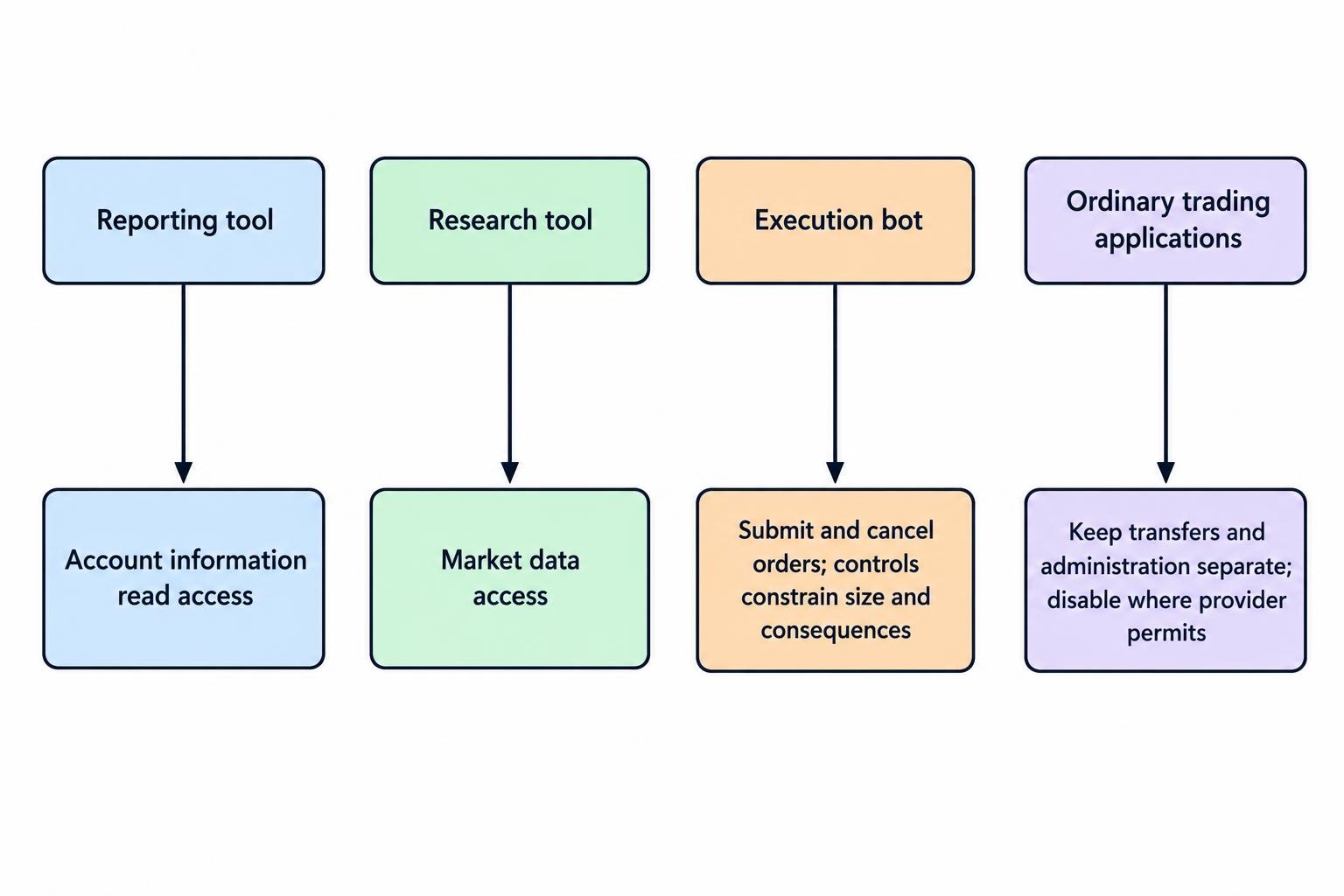
Design each connection around its job. A reporting tool should not receive order permissions just because they are available. An execution application should not receive transfer or account administration permissions unless there is a justified operational need.
Use this permission plan as a starting point, subject to the controls your provider actually offers:
- Reporting: Read access to the account information required for reconciliation.
- Research: Market data access without live order permissions.
- Execution: Order submission and cancellation for the intended account.
- Transfers and administration: Disabled for ordinary trading applications wherever separate controls exist.
Keep paper trading and live credentials separate. Use different credentials for different bots, rather than giving every application the same secret. Record which account and environment each credential belongs to, without copying its secret value into the inventory.
Consider a hypothetical dashboard and execution bot. The dashboard needs balances and fills; the bot needs to place and cancel orders. Giving both the same broad credential makes the dashboard unnecessarily powerful. Separate permissions make the intended boundary explicit.
Do not confuse “withdrawals disabled” with “harmless.” An application authorized to trade still needs pre-trade order and exposure checks. Account permissions decide which actions are allowed; trading controls should constrain the size and consequences of those actions.
Use Network Restrictions Without Breaking Recovery
If the provider supports an IP allowlist, consider restricting a server-based application to its expected outbound addresses. Document those addresses and test your backup connection before enabling the restriction. Do not remove the control casually because a deployment moved servers.
Ask what happens during failover: will the backup server have an approved address, and who can update the restriction? A security setting that nobody can maintain under pressure invites a hurried workaround.
Keep API Secrets Out of Code, Logs and Messages
Store production secrets in a dedicated secrets manager or another protected credential store suited to the deployment. Restrict which people and applications can retrieve them. Keep secret values out of source code, shared documents, screenshots and support messages. These practices follow the access control and lifecycle principles in the OWASP Secrets Management Cheat Sheet.
For a trading team, make the approved method easier than the shortcut. Give developers a documented way to connect an application without sending a secret through chat. Support tickets should identify the application and credential label, not reproduce the credential itself.
Before sending diagnostic material, review it for sensitive content. Ask support which fields they need and provide a redacted copy. Apply the same discipline to AI coding assistants and document analysis tools: use placeholders instead of production passwords, tokens or private account information.
Log useful security events without recording reusable credentials. Capture the time, application, action, result and a non-secret credential identifier. Exclude passwords, access tokens and session identifiers from ordinary diagnostic output, consistent with OWASP’s security logging guidance.
For example, “execution service authentication failed at 14:32 UTC” may help diagnose an outage. A complete authorization header does not belong beside it. Review debug settings before enabling verbose logging on a live system, and restrict access to the resulting records.
Check What Third-Party Trading Tools Can Access
Before connecting a portfolio tracker, analytics service or trading application, inspect the authorization request. Determine whether it receives a provider-issued token or asks you to disclose your login credentials. Check what account information it collects, whether access continues in the background and how you can revoke it. FINRA’s guidance on financial data aggregation risks addresses credential sharing, API arrangements and questions to ask before granting access.
Prefer a documented connection that offers a clear permission screen and revocation route. Do not approve access simply because an integration appears in a familiar dashboard. Read the permissions shown during setup and compare them with the task you want performed.
For a trade journal, ask why it needs anything beyond the information required to import transactions. For a hosted bot, ask who can retrieve its credentials, how you disconnect it and what happens when the subscription ends. Record the answers before connecting a live account.
Set a removal date for temporary trials. Cancelling a subscription and revoking account access should be separate items on your checklist, with confirmation of both.
Enable Alerts and Review Account Activity
Turn on available alerts for account logins, password changes, contact detail changes, transactions, transfers and newly linked external accounts. Review statements and trade confirmations for activity you did not authorize. These are practical safeguards included in the SEC’s investment account protection bulletin.
For automated trading, define what should trigger investigation. Examples might include a newly created credential nobody requested, authentication failures after a deployment or activity from an application scheduled to be offline. Assign someone to review alerts; an unattended inbox is not much of a response plan.
Protect the devices used to administer the account. Keep operating systems, browsers and trading applications updated, use screen locking and avoid public computers for account access. Verify unexpected account messages by opening the known application or saved address, rather than following the message’s login link.
During a routine review, compare the access inventory with the provider’s current settings. Look for unfamiliar devices, obsolete integrations and changed recovery details. Resolve discrepancies rather than assuming they belong to an old installation.
Respond Quickly to Suspected Credential Exposure
If an API secret appears in a public repository, revoke it promptly. Deleting the visible text is not enough: repository history, forks or other copies may retain it. GitHub’s sensitive data removal guidance puts credential revocation or rotation before repository cleanup.
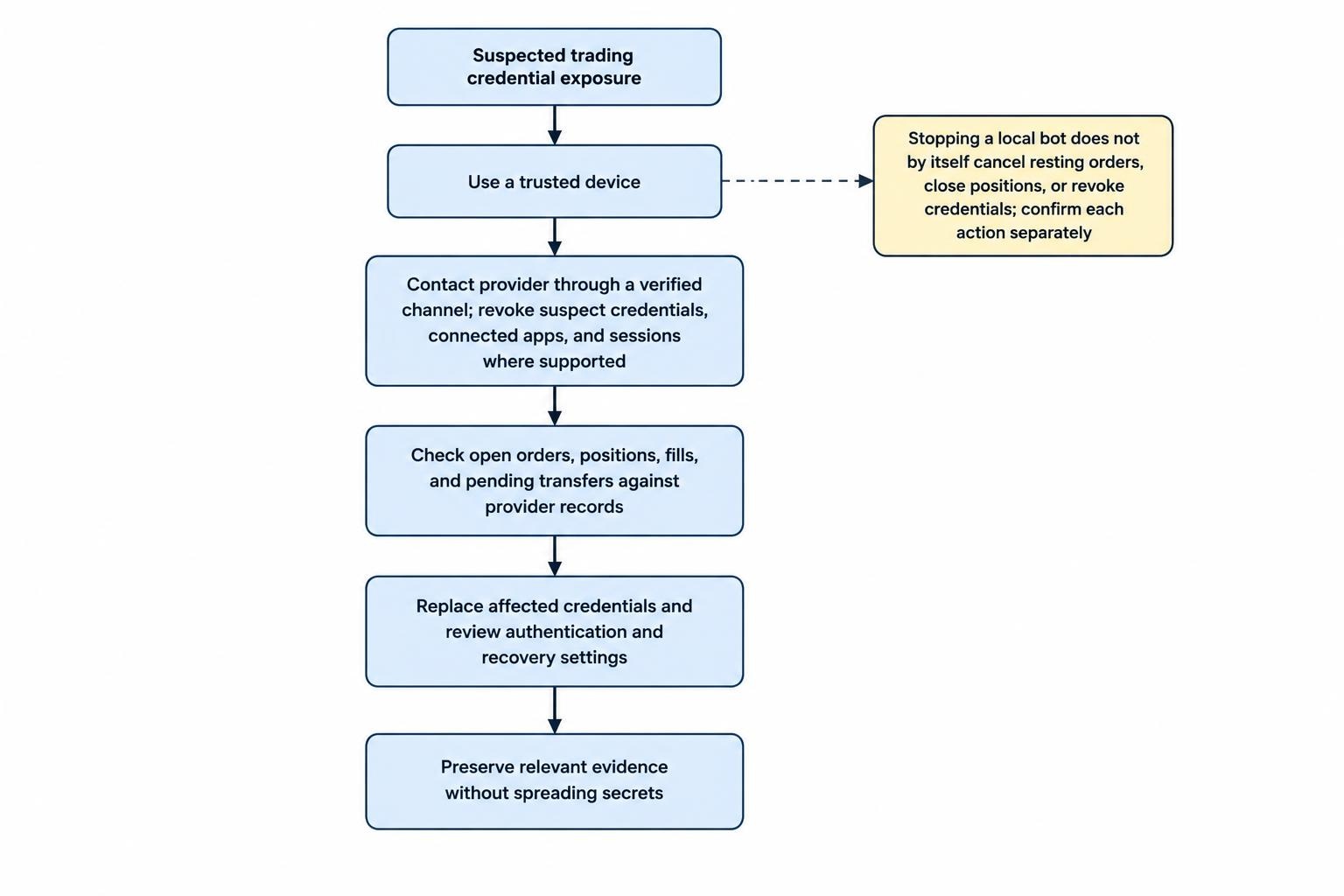
Prepare a response sequence before you need it:
- Use a trusted device. Avoid entering replacement credentials on a device you suspect is compromised.
- Contain account access. Contact the provider through a verified channel and revoke suspect credentials, connected applications and sessions where supported.
- Check trading state. Reconcile open orders, positions, fills and pending transfers with the provider’s records.
- Replace affected credentials. Review authentication and recovery settings, then update approved applications securely.
- Preserve evidence. Keep timestamps, relevant messages, order identifiers and support case details without spreading exposed secrets.
For automated execution, follow the prepared trading kill switch and emergency shutdown procedure. Do not assume that stopping a local bot cancels resting orders, closes positions or revokes its credentials. Confirm each action separately before restarting anything.
Finish by correcting the route that caused the exposure. That might mean removing a shared credential, changing diagnostic logging or replacing an unsafe support workflow. Keep the next review simple: confirm access owners, remove unused connections, test recovery and verify that every live credential still has a necessary job.